

Best Ergonomic Gadgets for Remote Work
Table of Contents
- Why Ergonomic Gadgets Matter for Remote Workers
- How to Prevent Back Pain While Working From Home
- Ergonomic Desk Setup Tips for Maximum Comfort
- Benefits of Standing Desks for Remote Workers
- Essential Ergonomic Gadgets That Reduce Strain
- Creating a Distraction-Free Workspace
- Conclusion
Last Updated: August 21, 2026
Why Ergonomic Gadgets Matter for Remote Workers
Physical discomfort is the top productivity barrier for remote workers, with Buffer's State of Remote Work Report showing that 71% cite it as their primary obstacle. Over 88% of home office workers report pain in at least one body part, with 64% experiencing neck pain and 57% dealing with lower back pain (RSD Journal, 2025). Musculoskeletal disorders account for 33% of all workplace injury and illness, and remote workers without formal ergonomic assessments face even higher risk.
The stakes are real. A manufacturing plant that implemented a full ergonomics program saw workers' compensation costs drop by 93%, absenteeism fall by 67%, and productivity rise by 54%. Poor ergonomics compounds over time, a slight misalignment today becomes chronic pain tomorrow.
How to Prevent Back Pain While Working From Home
Back pain dominates remote work complaints, and it's preventable. The root cause is poor alignment. When your monitor sits too low, your chair lacks lumbar support, or your keyboard forces your wrists into unnatural angles, your spine compensates. A University of Cincinnati study found that 52% of hybrid workers positioned their external monitor too low, and 31% had their primary monitor not centered. Another assessment revealed that 85% of university employees working from home used laptops, and 55% relied on the laptop monitor alone, resulting in over 40% reporting moderate to severe discomfort.
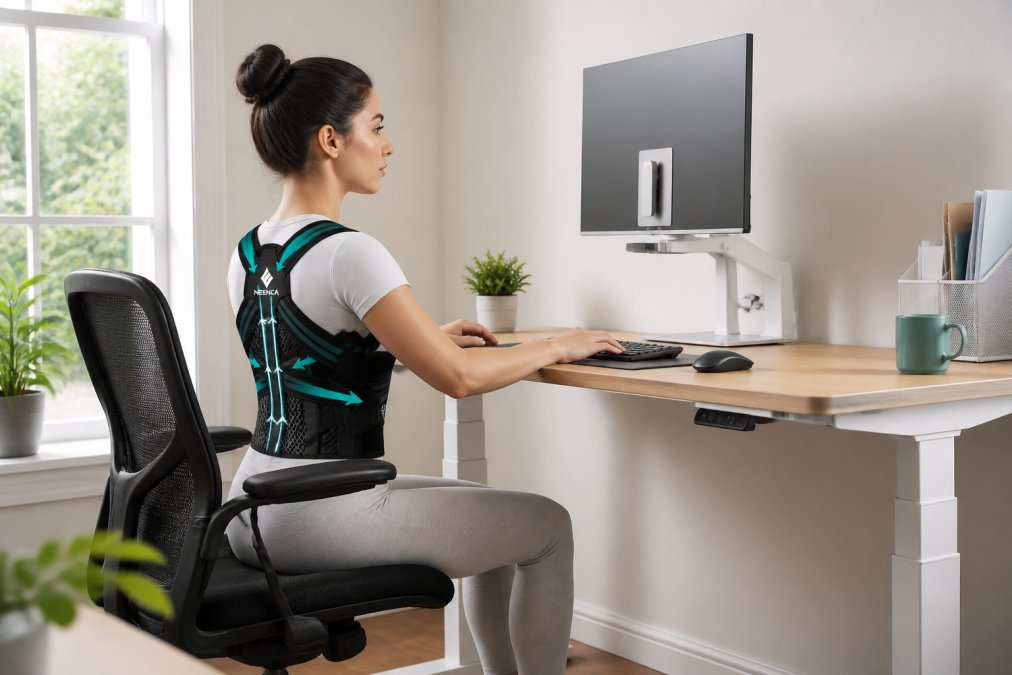
The fix starts with monitor height. Your eyes should align with the top third of your screen when sitting naturally. Move the monitor up using a monitor arm, stand, or books. Next, ensure your chair supports your lumbar spine. Keyboard and mouse placement matters too, your elbows should form a 90-degree angle when typing, with wrists in a neutral position. Finally, take movement seriously. The best posture is your next posture. Stand, stretch, and break static positions every 30 minutes.
Ergonomic Desk Setup Tips for Maximum Comfort
Your desk is the foundation of everything. Start by measuring your space realistically, you need room for your monitor, keyboard, mouse, and ideally a small area for paperwork. Height is critical. Standard desks sit at 30 inches, which doesn't work for everyone. Adjustable desks solve this problem. According to Future Market Insights, 61% of new home office desk purchases in 2026 now include height-adjustable features.
Cable management affects your setup's functionality. Use cable trays, clips, or sleeves to keep everything organized. Lighting deserves attention too, poor lighting causes eye strain and neck tension. Position your monitor perpendicular to windows to avoid glare and use ambient lighting to fill shadows. Temperature and acoustics round out the setup. Aim for 68-72°F, and use soft surfaces (rugs, curtains, fabric furniture) to absorb sound. ergonomic setup guide.
| Setup Element | Ideal Specification | Why It Matters |
|---|---|---|
| Monitor height | Top third at eye level | Prevents cervical spine strain |
| Desk height | Elbows at 90° when seated | Reduces shoulder and wrist strain |
| Chair support | Lumbar support + adjustable height | Prevents lower back pain |
| Keyboard position | Wrists neutral, elbows 90° | Prevents carpal tunnel and repetitive strain |
| Monitor distance | 20-26 inches from eyes | Reduces eye strain and neck strain |
| Lighting | Perpendicular to windows, ambient fill | Prevents eye strain and tension headaches |
Benefits of Standing Desks for Remote Workers
Standing desks let you alternate between sitting and standing, eliminating cumulative stress from staying in one position all day. According to Maker Stations' Standing Desk User Statistics, 42% of remote workers now consider electric liftable desks essential equipment for productivity and ergonomic comfort. Sitting compresses your spine and reduces blood flow; standing engages your core and improves circulation. Switching between the two every 30 to 60 minutes keeps your body active without fatigue.
Electric standing desks offer the easiest transition, you press a button to adjust height. Manual desks work too, but friction discourages frequent changes. Start with 20-30 minutes of standing per session, then gradually increase. Pair standing with movement: shift your weight, do calf raises, or pace while on calls. One caveat: standing desks don't solve poor posture. Monitor height, keyboard position, and footrest support matter just as much.
Essential Ergonomic Gadgets That Reduce Strain
Computer peripherals represent a 29.0% share of the work-from-home setup market in 2026 (Future Market Insights, 2026). These tools address specific pain points that desk setup alone can't solve.
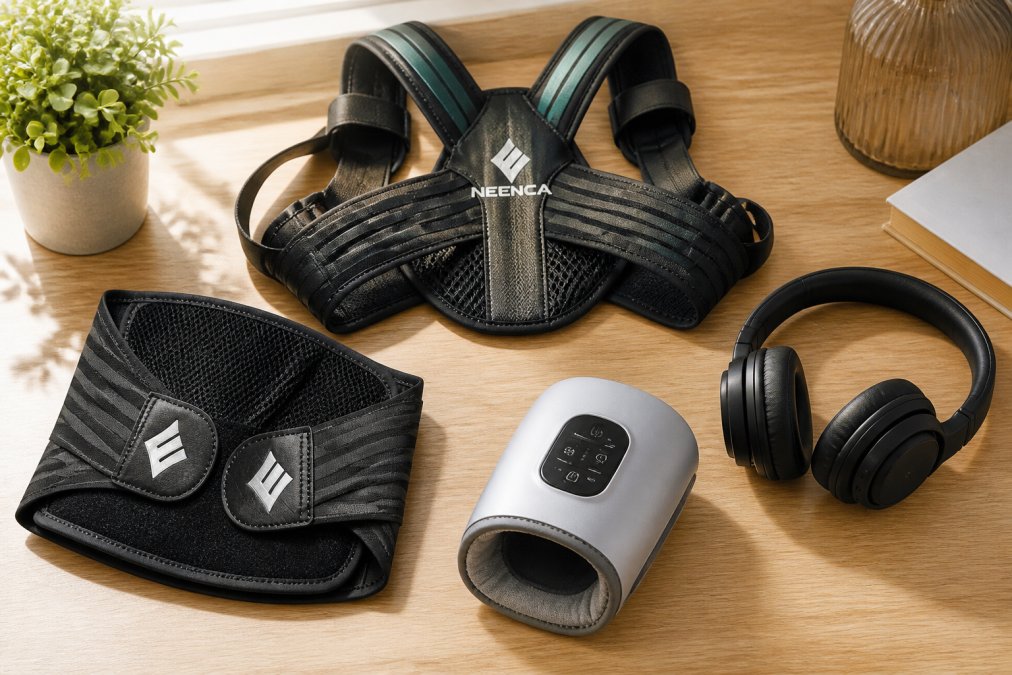
A vertical ergonomic mouse keeps your wrist in a neutral handshake position rather than the twisted palm-down angle of a standard mouse. Monitor arms free up desk space and let you adjust screen height and angle without moving the entire desk. Keyboard trays slide under your desk and tilt to position your hands optimally. Lumbar support cushions and back braces address lower back pain directly. ShopVerse.life offers the Posture Corrector Back Brace at $64.48, which provides targeted support with fully adjustable straps and soft, breathable nylon material for all-day wear. Footrests prevent leg dangling and eliminate lower back strain.

Posture Support and Back Braces
Poor posture is the root of most remote work pain. Posture braces provide external cues and support to retrain your body's alignment. A brace gently pulls your shoulders back and supports your spine, making slouching uncomfortable. Quality matters, cheap braces are stiff and uncomfortable, so you won't wear them. ShopVerse.life's posture corrector uses soft, breathable nylon with fully adjustable straps, making it practical for all-day wear at $64.48. Start with 2-3 hours per day and gradually increase to 6-8 hours. The goal is to retrain your posture, not to depend on the brace forever.
Wrist and Hand Relief Tools
Repetitive hand and wrist strain is insidious. Prevention is far easier than recovery. Ergonomic mice and keyboards are the first line of defense. Wrist rests support your hands in a neutral position, preventing the downward bend that strains tendons. For active pain or fatigue, ShopVerse.life's EMS Electric Cordless Hand Wrist Massager at $28.90 offers 10 vibration modes to relieve hand muscle fatigue. The cordless design and USB rechargeable battery make it convenient for regular use. Compression sleeves and braces stabilize your wrist during work, reducing the range of motion that irritates inflamed tendons.
Audio Solutions for Focus
Noise is a productivity killer. Noise-canceling headphones create a sonic barrier that lets you focus and reduces stress from constant auditory interruption. Quality matters significantly, cheap headphones muffle sound but don't eliminate it. Better options use active noise cancellation (ANC), which generates inverse sound waves that cancel background noise. ShopVerse.life offers the High-Quality Wireless Bluetooth-compatible Headphones at $39.14 with smart noise cancellation and Bluetooth V6.0 connectivity. For over-ear preference, the Lenovo LES-107 Wireless Over-Ear Bluetooth Sport Headphones at $61.00 feature 26 hours of battery life and a foldable design. White noise machines mask distracting sounds with consistent ambient sound. ShopVerse.life's Mini Tabletop Rockery Fountain at $57.64 generates gentle water sounds while adding a calming visual element, with a compact 7.09 x 5.91 inch footprint.


Creating a Distraction-Free Workspace
Ergonomic gadgets are only part of the equation. Your environment matters equally. A distraction-free workspace removes visual, auditory, and cognitive interruptions that fragment attention. Start with your visual field, clutter distracts your brain even subconsciously. Use storage solutions to keep supplies organized and out of sight. Lighting affects focus significantly. Dim lighting causes eye strain and fatigue. Position your desk near a window if possible, or use a combination of overhead and task lighting. Avoid harsh fluorescent lights.
Acoustics matter too. Hard surfaces reflect and amplify noise; soft surfaces absorb it. If your office has hard surfaces, add a rug and curtains to dampen sound. Temperature control affects both comfort and focus, aim for 68-72°F. Finally, establish boundaries. Close the door, set your status to "do not disturb," and communicate your focus time to household members. Uninterrupted focus blocks produce better work than fragmented attention.
Remote work offers flexibility, but it demands intentionality about your physical setup. The best ergonomic gadgets aren't one-size-fits-all solutions, they're targeted tools that address your specific pain points. Start by identifying where you hurt: neck, lower back, wrists, or eyes. Then invest in gadgets that directly address those areas.
At ShopVerse.life, we've curated a collection of ergonomic solutions designed to eliminate pain and boost productivity. From posture correctors and wrist massagers to noise-canceling headphones and lumbar support tools, each product is selected for real-world effectiveness. Our 100% secure payment, fast shipping, and money-back guarantee mean you can invest in your health without risk. Shop our ergonomic collection today and experience the difference a truly comfortable workspace makes.
=== FAQ ANSWERS (audit these too, same rules) ===
[1] Q: What are the most essential ergonomic gadgets for a home office? A: The foundation of an ergonomic home office includes a supportive chair, adjustable desk, monitor arm, external keyboard, and mouse. Research shows 71% of remote workers cite physical discomfort as their top productivity barrier. Adding a posture corrector ($64.48), wrist massager ($28.90), and noise-canceling headphones ($39.14-$61.00) addresses the most common pain points. Start with seating and desk height, then layer in accessories based on your specific discomfort areas.
[2] Q: How can ergonomic accessories improve remote work productivity? A: Ergonomic gadgets reduce musculoskeletal discomfort, which directly impacts focus and output. A 2023 study found 61.2% of homeworkers reported musculoskeletal discomfort, with laptop-only setups significantly increasing risk. Proper support, through lumbar braces, wrist relief tools, and monitor positioning, decreases pain-related distractions. When your body isn't sending pain signals, your brain allocates more resources to work tasks. Companies that implemented ergonomic programs saw productivity rise by 54% and absenteeism fall by 67%.
[3] Q: Are ergonomic keyboards and mice worth the investment? A: Yes, especially if you experience wrist or hand strain. Vertical mice and split keyboards maintain neutral wrist position, reducing carpal tunnel risk and repetitive strain injury. While budget options exist, investing in peripheral connectivity and adjustability pays off over months of daily use. The EMS Electric Cordless Hand Wrist Massager ($28.90) complements these tools by relieving existing tension. If you type 6+ hours daily, these accessories prevent long-term musculoskeletal damage that costs far more in healthcare.
[4] Q: What should I prioritize when setting up an ergonomic workspace? A: Monitor height comes first: position the top of your screen at or slightly below eye level to prevent neck strain. Next, ensure your chair supports lumbar curvature and your feet rest flat. A Posture Corrector Back Brace ($64.48) reinforces spinal alignment while you build habits. Then address keyboard and mouse placement to maintain neutral wrist position. Finally, reduce auditory distractions with noise-canceling headphones to minimize stress and improve focus. This phased approach prevents overwhelming investment while addressing the highest-impact factors first.
Frequently Asked Questions
Q: What are the most essential ergonomic gadgets for a home office?
A: The foundation of an ergonomic home office includes a supportive chair, adjustable desk, monitor arm, external keyboard, and mouse. Research shows 71% of remote workers cite physical discomfort as their top productivity barrier. Adding a posture corrector ($64.48), wrist massager ($28.90), and noise-canceling headphones ($39.14-$61.00) addresses the most common pain points. Start with seating and desk height, then layer in accessories based on your specific discomfort areas.
Q: How can ergonomic accessories improve remote work productivity?
A: Ergonomic gadgets reduce musculoskeletal discomfort, which directly impacts focus and output. A 2023 study found 61.2% of homeworkers reported musculoskeletal discomfort, with laptop-only setups significantly increasing risk. Proper support, through lumbar braces, wrist relief tools, and monitor positioning, decreases pain-related distractions. When your body isn't sending pain signals, your brain allocates more resources to work tasks. Companies that implemented ergonomic programs saw productivity rise by 54% and absenteeism fall by 67%.
Q: Are ergonomic keyboards and mice worth the investment?
A: Yes, especially if you experience wrist or hand strain. Vertical mice and split keyboards maintain neutral wrist position, reducing carpal tunnel risk and repetitive strain injury. While budget options exist, investing in peripheral connectivity and adjustability pays off over months of daily use. The EMS Electric Cordless Hand Wrist Massager ($28.90) complements these tools by relieving existing tension. If you type 6+ hours daily, these accessories prevent long-term musculoskeletal damage that costs far more in healthcare.
Q: What should I prioritize when setting up an ergonomic workspace?
A: Monitor height comes first: position the top of your screen at or slightly below eye level to prevent neck strain. Next, ensure your chair supports lumbar curvature and your feet rest flat. A Posture Corrector Back Brace ($64.48) reinforces spinal alignment while you build habits. Then address keyboard and mouse placement to maintain neutral wrist position. Finally, reduce auditory distractions with noise-canceling headphones to minimize stress and improve focus. This phased approach prevents overwhelming investment while addressing the highest-impact factors first.
This article was written using GrandRanker