

Best Ergonomic Office Electronics for Comfort
Table of Contents
- Why Ergonomic Office Electronics Matter for Your Comfort
- Best Ergonomic Office Chairs for Long Work Hours
- Ergonomic Keyboards and Mice That Reduce Wrist Strain
- Adjustable Standing Desks for Movement Throughout the Day
- Monitor Placement and Ergonomic Accessories
- Ergonomic Lighting Solutions to Prevent Eye Strain
- DIY Ergonomic Hacks and Budget-Friendly Alternatives
- Additional Ergonomic Tools: Footrests, Posture Correctors & Wrist Relief
Best Ergonomic Office Electronics for Comfort
Last Updated: July 19, 2026
Finding the best ergonomic office electronics for comfort reclaims your productivity and long-term health. Workers experiencing physical strain lose an average of 2-3 hours per week to pain-related distractions. This guide breaks down the essential ergonomic office electronics that deliver measurable comfort improvements and shows you how to build a setup that supports your body through an eight-hour workday.
Why Ergonomic Office Electronics Matter for Your Comfort
Poor ergonomics compounds over time. Standard office setups force your body into compromised positions: monitors sit too low, pulling your neck forward; keyboards sit too high, elevating your shoulders; chairs lack lumbar support, collapsing your spine. Together, these create accumulated strain that leads to chronic pain.
Investing in proper ergonomic office electronics prevents injury before it starts. Research from Cornell University's ergonomics lab demonstrates that workers using properly configured ergonomic setups report 27% fewer musculoskeletal complaints and take significantly fewer sick days.
Best Ergonomic Office Chairs for Long Work Hours
An ergonomic office chair is the foundation of your entire setup. A proper ergonomic chair gives you independent control over seat height, backrest recline, armrest height, and lumbar support intensity.
The Humanscale Freedom Headrest Chair represents the premium end of ergonomic seating. Its self-adjusting recline mechanism moves with your body weight automatically, and the pivoting backrest follows your spine's natural curve. The synchronous armrests move with the backrest, preventing awkward shoulder elevation.
For tighter budgets, the Steelcase Leap and Herman Miller Aeron remain industry standards. Both offer exceptional adjustability and durable construction. The Leap excels for larger frames, while the Aeron works better for smaller builds.
What to Look for in an Ergonomic Chair
Lumbar support is non-negotiable. Your lower back has a natural curve, and a proper chair maintains this rather than forcing you into a flat-backed position. Adjustable lumbar support lets you dial in the exact depth and height that matches your spine.
Seat depth matters significantly. A quality ergonomic chair offers a seat depth between 16-18 inches, allowing 2-3 fingers of space between the seat edge and the back of your knees when seated.
Armrest adjustability prevents shoulder strain. Look for chairs with 3D adjustable armrests, height, width, and angle all customizable. This prevents armrests from sitting too high (elevating shoulders) or too low (requiring awkward reaching).
Recline tension should be smooth and progressive. Premium ergonomic chairs use weight-activated recline mechanisms that feel natural and responsive.
Ergonomic Keyboards and Mice That Reduce Wrist Strain
Standard keyboards force your wrists into an extended position, compressing the median nerve and contributing to carpal tunnel syndrome. A vertical mouse changes your hand position from pronated (palm facing down) to a neutral handshake position, reducing forearm rotation and wrist stress.
The Logitech MX Vertical Ergonomic Wireless Mouse uses a 57-degree vertical angle that keeps your hand in a natural position. The thumb rest prevents awkward positioning, and the mouse connects via Logitech's Unifying Dongle or Bluetooth 5.3. The learning curve lasts about a week, but the reduction in wrist pressure becomes immediately noticeable.
For keyboards, the Logitech ERGO K860 Wireless Split Keyboard stands out. The split design keeps your hands at shoulder-width apart, preventing internal rotation. The curved frame follows your hands' natural position, and the integrated wrist rest has three layers of padding with adjustable palm lift to accommodate different desk heights.
Split Keyboards vs. Vertical Mice: Which Works Best
Both address different problems. Split keyboards prevent wrist extension and internal rotation, ideal if you spend 6+ hours daily typing. Vertical mice reduce forearm rotation and prevent wrist pinching, delivering faster relief if your primary complaint is wrist pain during mousing.
The optimal setup uses both. A split keyboard handles typing strain while a vertical mouse addresses mousing strain.
Adjustable Standing Desks for Movement Throughout the Day
Sitting all day is harmful. Standing desks create the option to move between sitting and standing throughout the day.
The UPLIFT V3 Standing Desk offers a height range from 22.6" to 48.7", accommodating both sitting and standing positions. The dual electric motors provide smooth, stable height adjustment even at maximum extension. Setup takes roughly 30 minutes.
A standing desk isn't a replacement for an ergonomic chair, it's a complement. The ideal workflow alternates between sitting and standing every 30-60 minutes. Standing for 2-3 hours continuously creates different problems like foot fatigue and lower back strain. The movement between positions delivers health benefits.
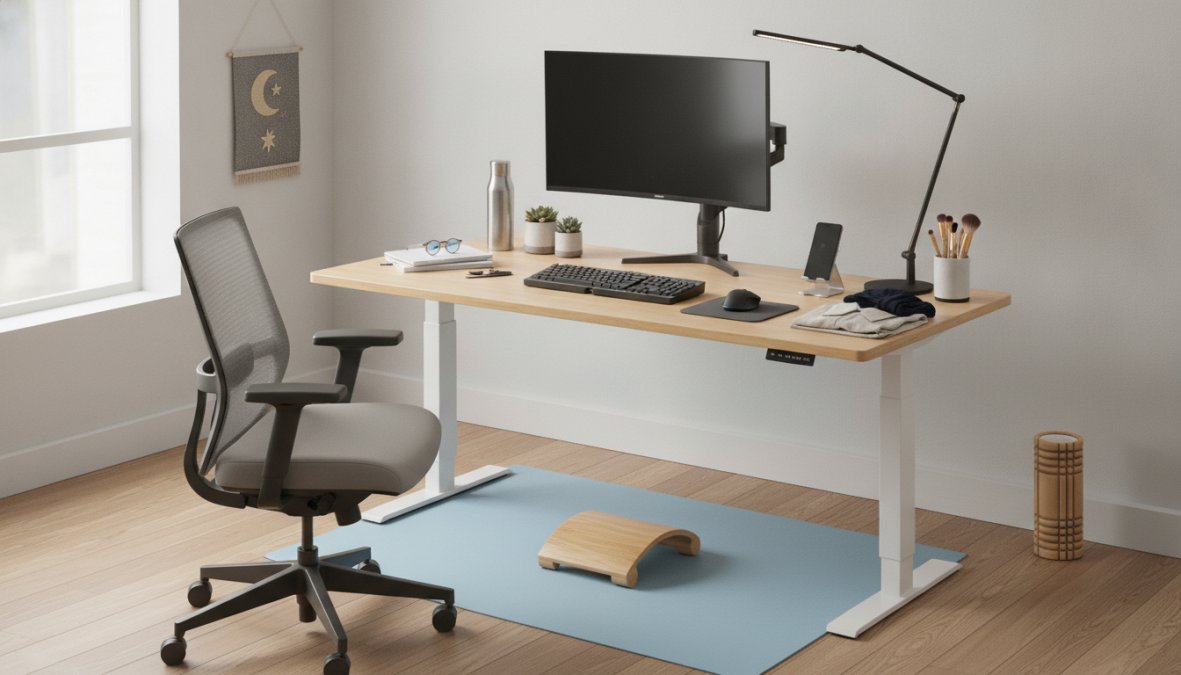
When standing, your monitor should be at eye level, your keyboard at elbow height, and your feet flat on the floor. Standing desks work best when paired with an anti-fatigue mat.
Monitor Placement and Ergonomic Accessories
Monitor height is one of the most underestimated ergonomic factors. Your monitor should sit at eye level when sitting in proper posture. Too low creates neck and upper back strain; too high creates different but equally problematic strain.
A monitor arm like the UPLIFT Desk Single Monitor Arm ($109) solves this completely. It offers full range of motion, height, tilt, swivel, and rotation, allowing precise positioning at eye level. The integrated cable management keeps cables organized, and the arm supports monitors up to 33 lbs.
For dual monitor setups, position one monitor directly in front at eye level and the second at a slight angle to prevent constant neck rotation.
Monitor distance matters. Your screen should sit about an arm's length away, roughly 20-26 inches from your eyes. Too close strains your eyes and brings your head forward; too far causes squinting or forward leaning.
The Humanscale Horizon 2.0 LED Task Lamp provides targeted, glare-free illumination. Most office lighting creates glare on screens. The Horizon's thin-film LED technology creates even light without glare, and the intuitive dimmer adjusts brightness based on task and time of day. It's Energy Star certified and lasts 50,000 hours.
Ergonomic Lighting Solutions to Prevent Eye Strain
Eye strain compounds throughout the day. Poor lighting forces your eyes to work harder, leading to headaches and fatigue. Task lighting provides focused, adjustable illumination directly on your work surface.
The Humanscale Horizon 2.0 eliminates glare while providing sufficient brightness for detailed work. Most desk lamps create hot spots of bright light surrounded by darker areas. The Horizon distributes light evenly across your entire work surface. Color temperature adjusts from warm (2700K) to cool (5000K), matching your circadian rhythm.
Position your task lamp to the side of your monitor, angled slightly downward. This provides illumination on your desk while preventing light from hitting your screen directly.
Natural light is ideal when available. Position your desk perpendicular to windows rather than facing them directly.
DIY Ergonomic Hacks and Budget-Friendly Alternatives
Not every ergonomic improvement requires hundreds of dollars.
Monitor height adjustment: Stack books or use a $20 monitor riser to get your screen to eye level.
Keyboard angle: Negative tilt (keyboard sloping away from you) is better for wrist health. Remove the feet or flip your keyboard over.
Footrest improvisation: A small box, stack of books, or ottoman works. The goal is getting your feet flat and knees at 90 degrees.
Lumbar support: A small pillow or rolled-up towel placed in your lower back's natural curve costs nothing and addresses the most common complaint.
Posture correction: The Posture Corrector Back Brace ($64.48) provides external feedback when you slouch. Use it for 2-3 hours daily rather than all day.
Wrist relief: The EMS Electric Cordless Hand Wrist Massager ($28.90) provides targeted vibration therapy. Ten vibration modes customize intensity. Use it for 10-15 minutes during lunch or after work.
Additional Ergonomic Tools: Footrests, Posture Correctors & Wrist Relief
Footrests prevent circulation problems when feet dangle. The Humanscale FM300 Foot Machine encourages subtle foot and leg movement, improving circulation and reducing fatigue without requiring conscious effort.
Posture correctors work by providing external feedback. When you slouch, the brace becomes uncomfortable, reminding you to sit up. Use them for 2-3 hours daily during high-concentration work, not all day, as constant use weakens core muscles.
Wrist relief tools address accumulated strain. The EMS Electric Cordless Hand Wrist Massager increases blood flow and reduces muscle tension. Most users find 10-15 minute sessions significantly reduce next-day wrist soreness.
Trackball mice like the Kensington Expert Mouse Wireless Trackball eliminate arm movement entirely, making them excellent for people with shoulder or elbow issues. The learning curve is steeper than vertical mice, but many users report superior comfort for precision work.
Building the best ergonomic office electronics for comfort isn't about buying the most expensive products, it's about understanding how your body interacts with your workspace and addressing your specific pain points. Start with your chair and monitor position, add a split keyboard and vertical mouse, then refine with accessories like task lighting and wrist relief tools. At ShopVerse.life, we've curated proven ergonomic products designed to eliminate strain and support your health. Shop our ergonomic collection today and experience the difference proper workspace setup makes in your daily comfort and productivity.
Frequently Asked Questions
What are the most important ergonomic office electronics for comfort?
The foundation of ergonomic comfort starts with three essentials: a supportive office chair with lumbar support and adjustability, an ergonomic keyboard and mouse to reduce wrist strain, and proper monitor placement at eye level. Adding a standing desk, task lighting, and accessories like footrests creates a comprehensive setup. Together, these best ergonomic office electronics for comfort work to maintain neutral posture, reduce repetitive strain, and prevent long-term pain from prolonged sitting and typing.
How do ergonomic keyboards and mice reduce wrist strain?
Ergonomic keyboards like the Logitech ERGO K860 feature split, curved designs with integrated wrist rests that keep your hands in a natural typing position, reducing forearm tension. Vertical mice such as the Logitech MX Vertical position your hand in a handshake grip rather than a flat palm position, minimizing wrist rotation and pressure. These designs work together to lower muscle activity and prevent repetitive strain injuries that develop from traditional flat keyboards and mice over months of use.
Should I invest in a standing desk or focus on chair comfort first?
Start with a high-quality ergonomic office chair if you're on a budget, it's your foundation for 6-8 hours daily. Once your chair supports proper posture, add a standing desk to introduce movement. Models like the UPLIFT V3 let you alternate sitting and standing, which improves circulation and reduces back pain more effectively than either alone. The ideal setup combines both, but a premium chair is the higher priority since you'll spend most of your workday seated.
How does ergonomic lighting prevent eye strain at my desk?
Task lighting reduces glare on screens and paper, which is a primary cause of eye fatigue. Ergonomic lights like the Humanscale Horizon 2.0 provide even, adjustable illumination without harsh shadows or reflections. Position your light source to the side of your monitor, not behind it, to minimize screen glare. Proper lighting also supports better posture because you won't unconsciously lean forward to see your work, which strains your neck and shoulders over time.
This article was written using GrandRanker