

Best Smart Home Companies: 2026 Buyer's Guide
Table of Contents
- What Makes a Smart Home Company Stand Out
- Best Smart Home Automation Systems: Core Platforms
- Smart Home Device Compatibility: The Interoperability Challenge
- How to Build a Smart Home from Scratch
- Privacy and Data Security: What You Need to Know
- Long-Term Maintenance Costs and Hidden Expenses
- Professional Installation vs. DIY Setup
- Common Mistakes to Avoid When Choosing a Smart Home Company
- Frequently Asked Questions
Last Updated: October 3, 2026
What Makes a Smart Home Company Stand Out
Who is the best smart home company? The answer depends on what you prioritize: ecosystem compatibility, ease of installation, long-term costs, or privacy protection.
Interoperability standards like Matter and Thread are reshaping how devices communicate. This shift matters because your investment in one company's platform is less likely to become obsolete when you upgrade or switch brands.
Best Smart Home Automation Systems: Core Platforms
The foundation of any smart home is the automation hub, the central device that coordinates everything else. A strong automation hub handles device management, creates reliable connectivity, and lets you build workflows without hiring a technician.
Most automation hubs now support local control, meaning your lights and locks work even if your internet connection drops. This is a critical reliability feature.
Smart Home Device Compatibility: The Interoperability Challenge
Device compatibility is where most smart home investments fail. The best smart home companies now support Matter, an open standard that allows devices from different manufacturers to communicate through a single hub.
Check the company's device compatibility list before committing. The best smart home companies publish transparent compatibility matrices so you know exactly what works and what doesn't.
How to Build a Smart Home from Scratch
Building a smart home doesn't require installing everything at once. A phased approach lets you learn what works for your lifestyle before investing heavily.
Step 1: Choose Your Automation Hub
Start by selecting your central hub. This decision shapes everything that follows. Your hub must support the devices you want to add over the next three years, not just today's purchases. Research which brands the hub supports natively and check if everything integrates through one interface. Test the hub's mobile app and voice assistant compatibility, you'll interact with these daily.
Step 2: Start with Smart Lighting and Climate Control
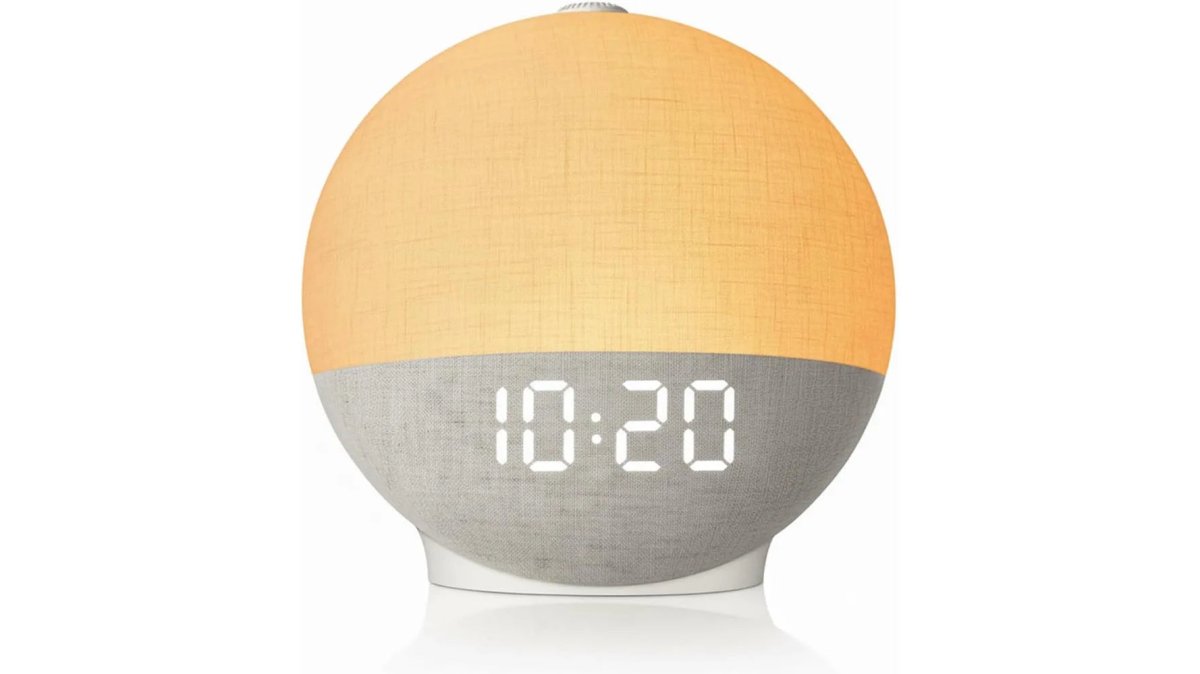
Begin with two categories: lighting and temperature. The Wake Up Light Sunrise Alarm Clock ($51.54) from ShopVerse.life combines these features with white noise and Bluetooth audio, ideal for testing whether you want full home automation or just targeted devices.

Climate control through a smart thermostat learns your schedule and adjusts temperature automatically. Start with one room's lighting and your main thermostat. Once you're comfortable with the automation, expand to other areas.
Step 3: Add Smart Security and Monitoring
After lighting and climate work smoothly, add security. This includes smart locks, cameras, and sensors. The Mini WiFi Camera 1080P HD ($22.18) from ShopVerse.life offers two-way audio and night vision for monitoring spaces while away. Smart locks let you unlock doors remotely and grant temporary access to guests. Sensors on doors and windows trigger alerts if opened unexpectedly.
Privacy and Data Security: What You Need to Know
Your smart home system collects sensitive behavioral data: when you're home, which rooms you occupy, temperature preferences, security patterns, and guest access logs.
Understanding Your Data Exposure
Start by mapping what data your system collects. A smart thermostat records temperature adjustments and occupancy patterns. Smart locks log every unlock event. Cameras capture video and audio. Collectively, this data reveals your daily schedule, habits, and vulnerabilities. The best smart home companies publish data collection inventories; if a company can't clearly list what it collects, that's a red flag.
Local vs. Cloud Processing: The Privacy Trade-off
Local control means your automation hub processes commands on your home network without sending data to cloud servers. This reduces exposure but limits features, cloud-based AI learning requires sending usage patterns to servers.
Ask directly: Which commands execute locally? Which require cloud processing? Encryption in transit (TLS/SSL) protects data traveling between devices and servers (Guidelines for the Selection, Configuration, and Use of Transport Layer Security (TLS)...).
Regulatory Compliance and Transparency Reports
The Federal Trade Commission (FTC) enforces consumer protection standards for IoT devices (the FTC). Companies claiming compliance should provide documentation. Under CCPA, you have the right to know what data is collected, delete your data, and opt out of data sales (California Consumer Privacy Act (CCPA) | State of California - Department of Justice).
Practical Privacy Audit Checklist
Before committing to a smart home company, work through this checklist:
Data Access & Deletion:
- Can you download all your data in a standard format (CSV, JSON)?
- Can you delete your account and all associated data permanently?
- How long does deletion take?
Third-Party Sharing:
- Does the company sell data to advertisers or data brokers?
- Can you opt out of data sharing without losing core functionality?
Security Practices:
- Does the company offer two-factor authentication (2FA) on your account?
- Are firmware updates automatic or manual?
- How quickly does it patch known vulnerabilities?
Device-Level Privacy:
- Can you disable microphones on voice-enabled devices?
- Can you disable cameras or cover them physically?
- Are there local-only modes that don't require internet connectivity?
Red Flags in Privacy Policies
Watch for vague language ("We may collect data" instead of "We collect the following data"), broad consent allowing policy changes without notification, undefined retention periods, unclear third-party access rules, lack of encryption details, and no opt-out options. If a company's privacy policy doesn't clearly answer your questions, that's intentional obfuscation.
Two-Factor Authentication and Account Security
Two-factor authentication (2FA) should be mandatory, not optional. If someone gains your password, 2FA prevents them from accessing your smart home system. Check whether the company supports 2FA before signing up.
Firmware Updates and Vulnerability Patching
Smart home devices are computers with vulnerabilities. The best smart home companies release firmware updates regularly and push them automatically to devices. Ask: How often does the company release firmware updates? Devices that stop working after a company discontinues support are a privacy risk and a waste of money.
Wake Up Light Sunrise Alarm Clock White Noise Sound Machine Bluetooth Speaker →
Long-Term Maintenance Costs and Hidden Expenses
The initial hardware purchase is only part of the cost. Over five years, maintenance, subscriptions, battery replacements, and network upgrades can exceed the original hub investment.
Subscription Fees: The Recurring Cost Model
Many smart home companies offer free basic automation but charge for advanced features.
Camera cloud storage is a separate subscription. A single 1080p camera recording 24/7 generates 100-200 GB monthly. Cloud storage costs $5-15/month per camera for 30-day rolling storage.
Calculate your likely subscription costs over five years.
Battery Replacement Cycles and Costs
Battery-powered devices require regular replacement. Smart locks need AA/AAA batteries ($2-5 per battery) every 1-2 years. Motion sensors use CR2032 coin batteries ($1-2 each) every 1-3 years. Door/window sensors use CR2032 batteries ($1-2 each) every 2-5 years. For a typical smart home with 20 battery-powered devices, budget $50-100/year for battery replacements. Over five years, that's $250-500.
Network Infrastructure Upgrades
Adding dozens of WiFi devices can overwhelm a standard router. A mesh WiFi system (3-pack) costs $150-300 and covers a typical home with strong signal in every room. A WiFi 6 router upgrade costs $100-200. If your current network is adequate, you might not need upgrades. But if you're adding 30+ devices, budget $150-300 for a mesh system.
Device Replacement Cycles and Obsolescence
Smart home technology evolves quickly. Automation hubs typically last 5-7 years before replacement becomes necessary. Smart lights last 5-10 years. Smart locks last 5-7 years. Thermostats last 7-10 years. Cameras last 3-5 years. Budget for replacing 20-30% of your devices every five years. If your initial investment is $2,000, expect to spend $400-600 every five years on replacements.
Professional Installation and Support Costs
Professional installation ranges from $500-2,000 depending on complexity. A basic setup costs $500-800. A comprehensive system costs $1,500-2,500. Professional support plans typically cost $10-30/month and include remote troubleshooting, firmware update management, and priority support.
Warranty and Extended Protection
Most smart home devices come with 1-2 year manufacturer warranties. Extended warranties or protection plans cost 10-20% of the device price and extend coverage to 3-5 years. Extended warranties are worth considering for devices you depend on (locks, thermostats) but optional for redundant devices (lights, sensors).
Five-Year Total Cost of Ownership Example
Here's a realistic breakdown for a moderate smart home setup:
Initial hardware: $1,500 Installation: $800 Subscriptions: $1,200 Battery replacements: $300 Network upgrade: $200 Device replacements: $400 Support/warranty: $300
Total: $4,700 over five years, or $940/year
This breaks down to roughly $78/month. Understanding this cost upfront helps you prioritize which devices deliver the most value.
Cost-Saving Strategies
Start small with a hub and 3-5 devices. Choose devices with local control to reduce reliance on cloud subscriptions. Buy devices with rechargeable batteries to lower long-term battery expenses. Use open standards (Matter/Thread) to reduce vendor lock-in. DIY installation saves $500-2,000 upfront if you're comfortable with basic setup. Negotiate bundled pricing and regularly review which subscriptions you actually use.
Professional Installation vs. DIY Setup
This decision depends on your technical comfort level and complexity of your desired automation. DIY installation is cheaper and faster for basic setups.
Professional installation ensures everything works correctly from day one. Installers know common problems and solve them efficiently.
The best smart home companies offer both options with clear documentation, video tutorials, and responsive customer service.
Common Mistakes to Avoid When Choosing a Smart Home Company
Mistake 1: Choosing based on brand recognition alone. Evaluate compatibility with devices you actually want. Mistake 2: Ignoring local control. Prioritize companies offering local automation and offline functionality. Mistake 3: Underestimating interoperability challenges. Test compatibility thoroughly before committing. Mistake 4: Neglecting privacy policies. Read them carefully and ask specific questions.
Choosing the right smart home company requires balancing compatibility, privacy, cost, and ease of use. At ShopVerse.life, we've curated smart home products that work together seamlessly, including the Magnetic Rechargeable 50 Wall Lamp ($52.98) for flexible smart lighting and the Modern Gold/Black LED Acrylic Wall Sconce ($61.86) for stylish automation-ready illumination.

Frequently Asked Questions
Which company is considered the best for smart home automation?
The best smart home company depends on your priorities: ecosystem compatibility, budget, and desired features. Leading platforms excel in different areas, some prioritize voice control integration, while others focus on local control and privacy. Evaluate based on whether you need seamless device connectivity, professional installation support, or DIY flexibility. Most top-tier companies offer robust automation hubs, smart lighting, climate control, and security integration. Consider your existing devices and which ecosystem aligns with your home's layout and long-term expansion plans.
What are the downsides of smart homes?
Smart home systems present several challenges: initial setup costs, ongoing maintenance and firmware updates, compatibility issues between different brands, and privacy concerns with cloud-based data storage. Some systems require professional installation, adding expense. Device dependency on stable WiFi connectivity can create frustration during outages. Interoperability limitations mean not all devices work seamlessly together. Additionally, long-term support varies, older devices may become obsolete as companies discontinue product lines. Data security remains a concern, as connected devices can be vulnerable if not properly secured.
How do I choose the right smart home ecosystem for my needs?
Start by identifying your core needs: security monitoring, energy management, lighting control, or voice automation. Research which platforms support the specific devices you want. Check interoperability standards like Matter or Thread for future flexibility. Compare professional installation options versus DIY setup based on your comfort level and available time. Review privacy policies and data encryption methods. Evaluate long-term costs beyond initial hardware, subscription fees, maintenance, and potential device replacements. Test user interfaces if possible. Finally, consider scalability: can the system grow as your needs expand without requiring a complete overhaul?
Are smart home devices compatible with each other?
Compatibility varies significantly. Many smart home devices operate on proprietary ecosystems, limiting cross-brand functionality. However, newer standards like Matter and Thread are improving interoperability, allowing devices from different manufacturers to communicate. Before purchasing, verify that devices support your chosen automation hub or protocol. Some platforms offer broader compatibility than others. Cloud-based systems often have better cross-brand support than local-control options. Always check product specifications and compatibility lists before buying. Building a cohesive smart home requires planning, mixing incompatible devices creates frustration and limits automation capabilities.
What should I look for when buying smart home gadgets?
Prioritize these factors: compatibility with your existing ecosystem, local versus cloud control preferences, data encryption and privacy protections, ease of setup (DIY or professional installation), and long-term manufacturer support. Check user reviews for reliability and responsiveness. Verify WiFi connectivity requirements and latency performance. Look for devices with firmware update support to address security vulnerabilities. Compare warranty terms and customer support availability. Consider total cost of ownership, including potential subscription fees. Assess whether the device integrates with your voice assistant. Finally, evaluate future scalability, choose gadgets that support emerging standards like Matter to avoid obsolescence.