

How to Identify Authentic Electronics Online in 2026
Table of Contents
- Why Counterfeit Electronics Are a Growing Threat
- How to Spot Fake Electronics Websites
- How to Verify Product Authenticity Before You Buy
- Red Flags in Pricing and Seller Behavior
- Safe Online Shopping Practices for Electronics
- Physical Inspection Techniques for Delivered Goods
- Using AI-Generated Scam Detection Tools
- Conclusion: Building Confidence in Your Online Electronics Purchases
- Frequently Asked Questions
Last Updated: September 27, 2026
Why Counterfeit Electronics Are a Growing Threat
Counterfeit electronics have become a serious problem for online shoppers. The FBI and U.S. Customs and Border Protection regularly seize fake devices at ports. Many look identical to the real thing, right down to the logo.
How to Spot Fake Electronics Websites
Fake websites are the first line of attack. A scam site can copy a real brand's design in hours. The good news is that most leave small clues behind.
Check the URL and SSL Certificate
A secure sockets layer (SSL) certificate encrypts data between your browser and a site. Look for the padlock icon and "https://" in the address bar.
Look for Missing Contact Information and Policy Pages
Real sellers post a phone number, email, and physical address. Fake sites hide this. If you cannot find a return policy or a real address, walk away.
- No phone number or live chat
- No return or refund page
- No privacy policy
- Stock photos instead of real product images
How to Verify Product Authenticity Before You Buy
Verifying product authenticity before checkout saves you from most problems. It takes about five minutes once you know what to check, and it is the single highest-leverage step in the entire process.
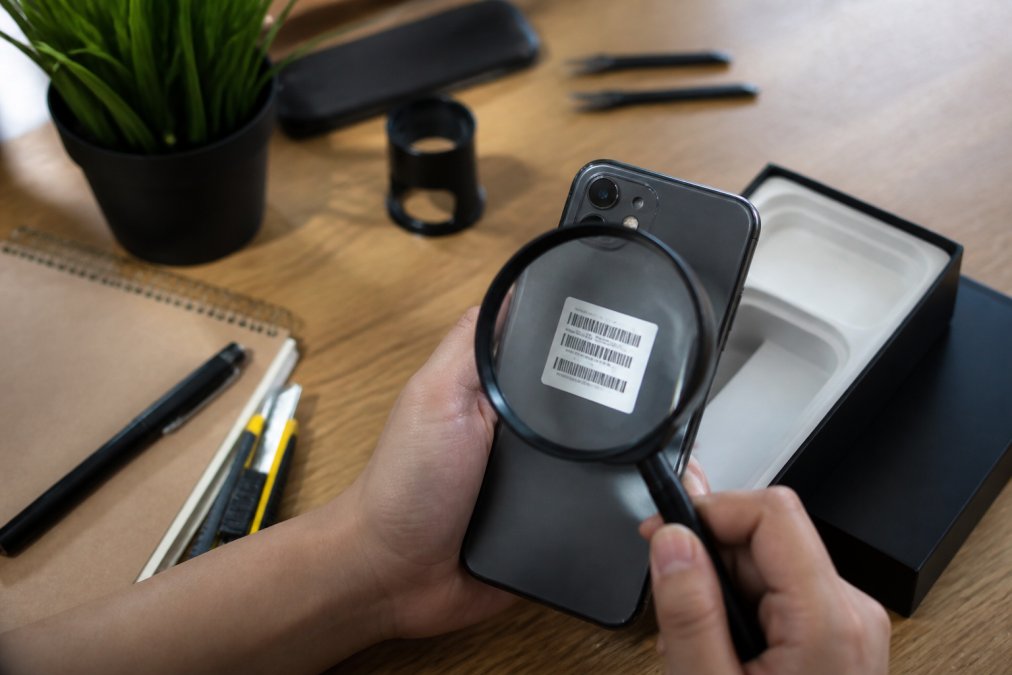
Serial Number Verification and Manufacturer Tools
Most major brands give each device a unique serial number, and nearly all of them publish a free lookup tool. The serial is the closest thing to a birth certificate a device has.
Here is the process:
- Find the serial number on the listing, in the product photos, or in the seller's spec sheet.
- Go to the manufacturer's official website, type the domain yourself rather than clicking a link in the listing.
- Use their serial number lookup or warranty-check tool.
- Confirm the number matches the model, the region, and the warranty start date.
A few well-known examples of where these tools live:
-
Apple, the "Check Coverage" page lets you enter a serial number and see the model, purchase date, and warranty status.
-
Samsung, the "Check Warranty" tool returns the model and warranty period for registered devices.
-
Dell, the support site accepts a Service Tag or Express Service Code and returns the exact configuration shipped from the factory.
-
Sony, LG, and Bose, each publishes a warranty or product-registration lookup on its support pages.
-
A serial that returns "not found" or "not registered" is a strong signal the item is counterfeit, gray-market, or stolen.
-
A serial that returns a different model than the listing means the seller is misrepresenting the product, even if the device itself is genuine.
How to Read a Serial or Model Number
Serial and model numbers follow patterns. Learning the pattern for a brand you buy often makes fakes obvious.
- Apple serial numbers are 10-12 alphanumeric characters; older units encode the factory and manufacture week in specific positions.
- Dell Service Tags are 7 characters; Express Service Codes are 11-12 digits and are numeric translations of the same tag.
- Samsung model numbers typically begin with a two-letter category code (for example, "SM-" for phones, "UN" for TVs) followed by the screen size and generation year.
Checking Product Specifications and Packaging Details
Compare the listed specs against the manufacturer's official product page, not against another marketplace listing, which may itself be copied from a fake.
Watch for these tells:
- Misspelled brand names in the title ("Samsng," "Appel," "Bose" with an accent mark)
- Specs that do not match the official model (wrong battery capacity, wrong port type, wrong screen resolution)
- Low-resolution or copied product photos, reverse-image search them
- Missing model numbers, or a model number that does not exist on the brand's site
- "OEM," "unlocked," or "international version" language used to explain away a warranty that does not apply
Warranty Registration as the Decisive Test
If you can, register the product with the manufacturer before the return window closes. Registration forces the brand's system to validate the serial against its own database. A device that fails registration is almost never authentic, and the failure gives you written proof to use in a dispute with the seller or your card issuer.
Authorized Dealer and Channel Checks
Most brands publish a list of authorized retailers and resellers on their website. If a seller is not on that list, the product is not covered by the manufacturer's warranty, even if it is genuine. This matters because counterfeiters and gray-market importers both rely on buyers who assume "real product" and "warrantied product" are the same thing. They are not.
Red Flags in Pricing and Seller Behavior
A price that looks too good usually is. This is the simplest rule in e-commerce safety, and it holds up almost every time.
- New seller with no history
- Pressure to pay outside the platform
- Requests for gift cards or wire transfers
- No response to basic questions
Safe Online Shopping Practices for Electronics
Safe online shopping practices for electronics come down to three things: verified sellers, secure payments, and a clear return path.
| Check | What to Do | Why It Matters |
|---|---|---|
| Seller status | Confirm on brand's dealer list | Blocks unauthorized retailers |
| Payment method | Use credit card or protected gateway | Enables chargeback rights |
| Return policy | Read it before buying | Protects against damaged goods |
| Reviews | Filter for verified purchase | Filters out fake praise |
Physical Inspection Techniques for Delivered Goods
Most guides stop at the pre-purchase checklist. The truth is that the most convincing counterfeits pass every online test and only reveal themselves once the box is open. This section covers what to do in the first 30 minutes after delivery, the phase competitors largely skip.
Inspect the Packaging First
Start with the box before you open it.
- Print quality, real packaging has sharp, high-resolution logos and text. Fakes often show blurry edges, off-color logos, or slightly wrong fonts.
- Holograms and seals, many brands use holographic stickers or tamper seals. Tilt them under light; a real hologram shifts color and shows depth. A printed sticker does not.
- Box weight and feel, counterfeit packaging is often lighter, flimsier, or uses a different cardboard grade than the genuine article.
- Language and region codes, a "US version" device should not arrive in packaging labeled for another region unless the listing said so.
Match the Serial Across Device, Box, and Listing
The serial number should appear in three places: on the device, on the box, and in the original listing. All three must match. If any one differs, you are almost certainly holding a counterfeit, a refurbished unit sold as new, or a stolen device.
Firmware and Software Checks
This is where counterfeits fall apart. The hardware can be cloned; the software usually cannot.
- Check the build number. On Android, go to Settings → About Phone → Build Number. On iOS, Settings → General → About → Version. Compare against the official build for that model and region. Odd or missing build numbers are a red flag.
- Run the manufacturer's own diagnostic. Apple's "Check Coverage" works on the device itself. Samsung Members and Dell SupportAssist both validate the hardware against the brand's database.
- Try to update the firmware. Genuine devices accept official over-the-air updates. Counterfeits often fail the update, brick, or revert to a generic build.
- Check the IMEI on phones. Dial *#06# to display the IMEI, then compare it to the number printed on the box and in the settings menu. All three should match.
Component and Performance Checks
- Weight, compare against the official spec sheet. Counterfeits often use cheaper batteries and housings that change the weight by 10-20 grams.
- Ports and buttons, every port should accept the correct cable with a firm click. Loose USB-C, misaligned headphone jacks, and mushy buttons are common on fakes.
- Screen, check for dead pixels, uneven backlighting, and incorrect color temperature. Genuine panels are calibrated; fakes usually are not.
- Battery, check the reported capacity in settings against the official spec. Counterfeits frequently report a higher capacity than the cell can actually deliver.
- Accessories, cables, chargers, and adapters should match the brand's official design. Counterfeit bundles often include generic accessories.
Document Everything Before You Open a Dispute
If the inspection fails, your ability to recover your money depends on the evidence you collect in the first hour.
- Photograph the packaging, the serial labels, and the device before you return anything.
- Screenshot the original listing, including the price, the seller name, and the delivery date.
- Save the manufacturer's lookup result showing the serial failed or returned a different model.
- File the dispute within the platform's window. Most major marketplaces give you 30 days from delivery; credit card chargebacks generally must be filed within 60 days of the statement date.
- Report the seller to the platform, the manufacturer's brand-protection team, and, if the loss is significant, the FTC at ReportFraud.ftc.gov.
When to Return vs. When to Escalate
If the seller offers a no-questions-asked return and refund, take it and move on. If the seller stalls, demands you pay return shipping, or asks you to close the dispute before refunding, stop communicating and escalate directly to your card issuer. Under the Fair Credit Billing Act, you have the right to dispute charges for goods that were misrepresented, and the card issuer, not the seller, becomes your counterparty.
Using AI-Generated Scam Detection Tools
AI scam detection tools now scan listings for fraud patterns in seconds. They check seller history, image reuse, and language that matches known scams.
FTC guidance on avoiding online shopping scams
Conclusion: Building Confidence in Your Online Electronics Purchases
The steps above turn a risky purchase into a routine one. Check the site, verify the serial number, pay securely, and inspect the box. That routine blocks most scams.
Frequently Asked Questions
How can I verify if an online store is legit?
Check for a secure SSL certificate (look for 'https' and a padlock icon), read independent customer reviews, and verify the store's physical address and phone number. Legitimate retailers list clear return policies and warranty information. You can also search the store's name with terms like 'scam' or 'complaints' to see if other shoppers reported issues. For electronics, confirm the store is an authorized dealer by checking the manufacturer's website.
What are the red flags of a fake electronics website?
Common red flags include prices that are significantly lower than other retailers, missing contact information, no return policy or a very short return window, and poor grammar or spelling on the site. Fake sites often use generic product photos and have limited payment options, sometimes only accepting wire transfers or cryptocurrency. If a site pressures you to buy quickly or offers deals that seem too good to be true, proceed with caution.
How do I check if a product serial number is authentic?
Visit the manufacturer's official website and look for a warranty or authenticity check page. Enter the serial number exactly as it appears on the product or packaging. If the number is not recognized or has already been registered, the product may be counterfeit. Some manufacturers also provide phone or email support for verification. Keep a record of the serial number and your purchase receipt for future reference.
What should I look for in an online electronics retailer's return policy?
A solid return policy should allow at least 14 to 30 days for returns, cover defective items, and provide a clear refund timeline. Look for restocking fees and whether original packaging is required. The policy should be easy to find on the website, not buried in fine print. Retailers that offer a money-back guarantee are generally more reliable for electronics purchases.