

How to Set Up a Home Office in a Closet: 2026 Guide
Table of Contents
- Why a Home Office in a Closet Works
- Step 1: Clear Out and Prep the Closet Space
- Step 2: Measure and Plan Your Desk Surface
- Step 3: Install Power and Manage Cables
- Step 4: Choose Closet Office Lighting Solutions
- Step 5: Pick the Best Ergonomic Gadgets for Remote Work
- Step 6: Apply Small Home Office Organization Ideas
- Step 7: Manage Ventilation, Sound, and Final Touches
- Frequently Asked Questions
Last Updated: September 9, 2026
The average American worker spends over 1,800 hours per year at their job, and for the growing remote workforce, that time is spent at home. This guide from ShopVerse.life walks through the practical steps to set up a home office in a closet that supports focus, comfort, and productivity.
A well-designed home office setup provides increased comfort, higher engagement, and improved productivity, according to Steelcase Research on workplace design. The "cloffice" trend, highlighted by Better Homes & Gardens, has grown because closing the door at the end of the day creates a clear mental boundary between work and personal life. Below, we'll show you exactly how to transform that cramped nook into a space that works as hard as you do.
Why a Home Office in a Closet Works
A home office in a closet works because it separates professional life from personal space without requiring a full room renovation. The key advantage is psychological: when you close the door, work disappears.
The movement has real momentum. Converting closets into dedicated, closable workspaces has seen increased adoption as people seek to define boundaries in their homes Better Homes & Gardens 2026 trend report. Beyond the mental benefits, a closet conversion forces you to be intentional. You cannot accumulate clutter in a space that is four feet wide. That constraint drives minimalist, efficient design choices that many traditional home offices lack.
Step 1: Clear Out and Prep the Closet Space
Start by removing everything: clothes, shelves, rods, and any debris. This is the messiest part of the project, but it is non-negotiable, you need a blank canvas to measure accurately and plan your layout.
Once empty, address the walls. Fill screw holes from old shelving and patch any damage from closet rod removal. A fresh coat of interior paint in a light, neutral tone will make the space feel larger and brighter than it actually is. Dark colors close in an already compact area.
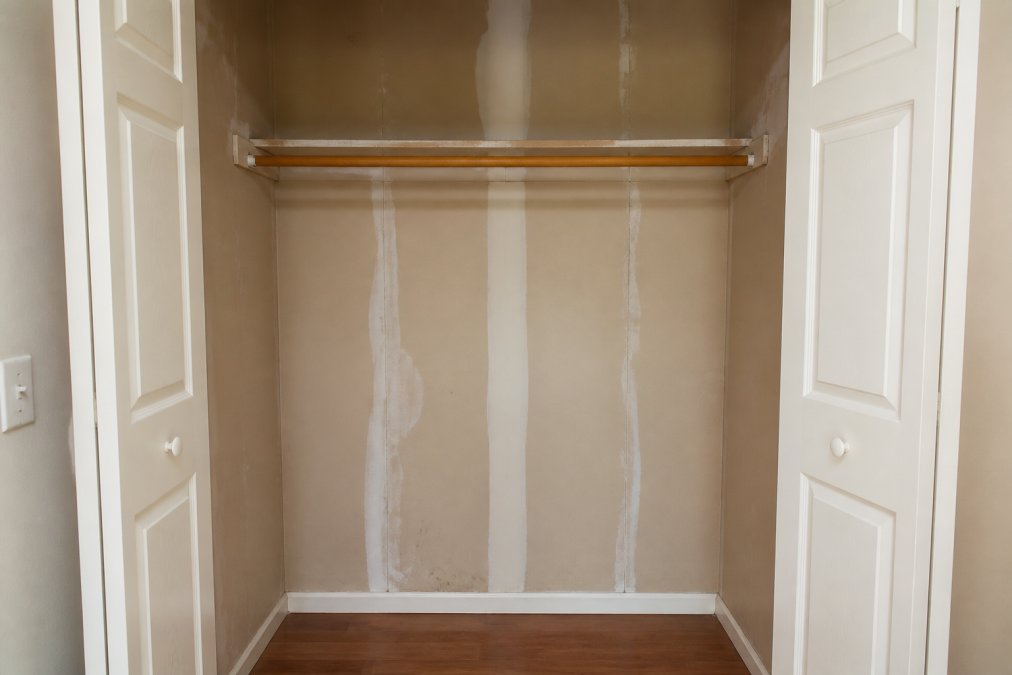
Case studies show this preparation pays off. One homeowner transformed a standard closet into an efficient home office by focusing on design, compliance, and budgeting, demonstrating that even minimal square footage can support functional remote work Bentley Brewing case study. Another DIY project achieved a fully organized, functional closet office system through careful planning and installation The DIY Playbook. The lesson is consistent: prep work determines the final result.
Step 2: Measure and Plan Your Desk Surface
Accurate measurements are the foundation of a successful closet office. Measure the width, depth, and height of the space. Standard closets are roughly 24 inches deep, which is tight but workable.
Your desk options fall into three categories: a floating shelf, a compact desk on legs, or a custom built-in. A floating surface maximizes floor space, which is critical in a narrow enclosure. For depth under 20 inches, consider a keyboard tray that slides out when needed.
Vertical space optimization is a major industry focus, using wall height for shelving to compensate for limited floor area The Closet Rehab on vertical storage. Plan for a monitor riser or wall-mounted monitor arm to free up valuable desk real estate. Measure twice before drilling; a misaligned surface will frustrate you daily.
Step 3: Install Power and Manage Cables
Power is the most overlooked element in closet conversions. Most closets have a single overhead light fixture and no outlets. You need a safe, reliable power solution before anything else works.
A surge-protected power strip with a long cord is the simplest fix, but you must verify the cord reaches an existing outlet. For a cleaner look, hire a licensed electrician to install an outlet inside the closet.
Cable management keeps a small space from becoming a tangled mess. Use adhesive cable clips along the back wall, a cable tray under the desk to hide the power strip, and Velcro ties to group cables so you can identify and unplug devices easily.
| Common Mistake | Fix | Impact |
|---|---|---|
| Relying on a single extension cord | Install a dedicated outlet or use a surge protector | Prevents fire risk and overloads |
| Letting cables pile on the floor | Use adhesive clips and a cable tray | Keeps the space clean and safe |
| Ignoring cord length needs | Measure distance to nearest outlet first | Avoids awkward, unsafe stretching |
Step 4: Choose Closet Office Lighting Solutions
Task lighting is non-negotiable in a closet office. Overhead fixtures cast shadows, and the closet's depth often blocks natural light entirely, so you need a dedicated light source aimed at your work surface.
A rechargeable wall lamp is an excellent solution because it requires no wiring. The Magnetic Rechargeable 50 Wall Lamp offers wiring-free installation with a magnetic mount, ideal for renters. At $52.98, it provides focused illumination without the hassle of an electrician.

Position your light source to eliminate shadows on your keyboard and documents. If you write or read on paper, place the lamp opposite your dominant hand. For video calls, position a light behind your monitor at eye level to prevent harsh facial shadows.
Step 5: Pick the Best Ergonomic Gadgets for Remote Work
Most closet-office guides stop at "buy a good chair," but that advice falls apart when the space is 24 inches deep and 36 inches wide. The unique risk here is static loading, the slow strain from being unable to shift your position naturally. In a closet, your range of motion is measured in inches, so the setup must encourage micro-movements and neutral alignment.
The 90-90-90 rule gets harder to hit. OSHA and ANSI reference neutral posture principles: elbows, hips, and knees at 90 degrees. If your desk is too shallow, your keyboard sits too close, forcing your elbows behind your torso. The fix is a keyboard tray that mounts under the desk and slides out, restoring the 90-degree angle.
Monitor height is a silent productivity killer. When your screen is below eye level, you tilt your head forward. The average head weighs 10 to 12 pounds, and for every inch it moves forward, the load on your cervical spine roughly doubles. A wall-mounted monitor arm is the best ergonomic investment for a cloffice because it does not consume desk depth. Position the top of the monitor at or slightly below eye level, about an arm's length away. For a laptop, a laptop riser with a separate Bluetooth keyboard achieves the same result for under $40.

Chair selection is about width, not just lumbar support. A standard ergonomic chair with armrests is often 26 to 28 inches wide, which will not fit through a standard 24- to 30-inch closet opening. Measure the interior width of the closet, not the door frame. A kneeling chair (20 to 22 inches wide) tilts your pelvis forward and eliminates the armrest problem. A saddle stool forces active sitting, engaging your core. If you use a conventional chair, remove the armrests if possible.
Footrests are underrated in tight spaces. When your chair is too high for the desk, your feet dangle, cutting off circulation and pulling your lower back out of alignment. A small, angled footrest, even a stack of sturdy books, restores a stable base.
The trade-off: ergonomics vs. space. Every ergonomic addition competes for the same few cubic feet. Prioritize the spine and neck first (monitor height and keyboard position), then the hips and knees (chair and footrest), and only then worry about wrist rests.
A final note on eye strain: in a small, enclosed space, your eyes have no distant object to focus on. The American Optometric Association recommends the 20-20-20 rule, every 20 minutes, look at something 20 feet away for 20 seconds. In a closet, that means looking out the door or at a wall-mounted mirror placed to reflect a distant window.
Step 6: Apply Small Home Office Organization Ideas
Small home office organization ideas focus on using every inch of vertical space. In a closet, floor space is precious, so think upward. Install shelving units above the desk for supplies, reference books, and decor that would otherwise clutter your work surface.
The DIY approach works well here. Installing a new organizational system within a closet to create a dedicated home office can be done without professional help, as demonstrated by the successful project from The DIY Playbook. Use stackable bins labeled by category: tech accessories, stationery, and paperwork. A pegboard on the back wall holds frequently used tools and cables within arm's reach.
Consider a silent wall clock to keep track of time without the distraction of ticking, which can be amplified in a small, enclosed space. The Creative Gradient Tempered Glass Wall Clock offers silent timekeeping and doubles as a decorative element. At $77.08, it adds function without the noise that disrupts focus.
Step 7: Manage Ventilation, Sound, and Final Touches
Closets are designed to hold clothes, not people and electronics. The average closet has no dedicated HVAC vent, and the door, when closed, creates a sealed microclimate. Within 30 to 45 minutes of active work, carbon dioxide levels rise, humidity increases, and the space feels stuffy. Elevated CO2 levels are associated with reduced cognitive performance and drowsiness, according to NIOSH research.
Airflow: create a cross-draft. A single fan does not solve the problem if the air is trapped. The goal is air exchange, bringing fresh air in and pushing stale air out. If your closet has a louvered door, you already have passive ventilation. If it has a solid door, you need to create a path. Options include:
- A USB desk fan ($15 to $30) aimed at your face and torso. This provides evaporative cooling and a sense of airflow, but it does not exchange air.
- A small clip-on fan mounted near the top of the closet, pointing outward toward the gap under the door. This pushes hot, stale air out and draws cooler air in from the room. This is the most effective low-cost solution.
- Leaving the door cracked two to four inches during long sessions. This is the simplest fix and often the most practical, especially if you are on calls and do not need full sound isolation.
- A plug-in air purifier with a HEPA filter (around $50 to $100) if you have allergies or the closet is near a dusty area. The filter also creates a slight air movement that helps with circulation.
Heat buildup from electronics is a real issue. A laptop, monitor, and peripherals generate surprising heat in a 4-by-6-foot space. If your laptop is wedged against a shelf or wall, the heat has nowhere to go, and the device will throttle performance. Ensure at least two inches of clearance around any exhaust vent. A laptop cooling stand with an integrated fan can lower surface temperatures by 10 to 15 degrees Fahrenheit.
Sound: the echo problem. A closet is essentially a small, hard-sided box. Drywall, a solid door, and a hard floor create slap-back echo that makes your voice sound hollow on video calls. The fix is sound absorption, not soundproofing, you are trying to keep your voice from bouncing around and to prevent keyboard clicks from sounding like gunfire on the microphone.
- Acoustic foam panels (2-inch thick, 12-by-12-inch squares) placed on the back wall behind your monitor absorb mid- and high-frequency sounds. A set of six panels costs roughly $20 to $35 on Amazon. Do not cover the entire wall, three to four panels at ear height are sufficient.
- A small area rug (3-by-5 feet or smaller) on the floor absorbs sound and prevents the hollow sound of a chair rolling on a hard surface. If the closet is carpeted, skip this.
- Fabric-covered bulletin boards or curtains hung on the side walls add absorption and double as organization surfaces. A tension rod with a heavy curtain across the back wall is a budget-friendly acoustic treatment.
- For calls, position your microphone close to your mouth (a headset or a boom arm) so the microphone picks up your voice directly, not the room echo. This is the single most effective fix for audio quality in a small space.
The door is your best acoustic tool, and your worst enemy. A solid-core door blocks more sound than a hollow-core door. If you have a hollow-core door and take frequent calls, consider replacing it with a solid-core model (around $100 to $200) or adding a door sweep and weatherstripping to seal gaps. The trade-off is that a sealed door worsens ventilation, so pair it with the fan or cracked-door strategy.
Final touches that matter more than decor. In a closet office, every item must earn its place. A small desktop humidistat ($10 to $15) tells you if the space is too dry or too humid. ASHRAE recommends indoor relative humidity between 30% and 60% for comfort and health.
A note on the door itself. If you keep the door closed for privacy, install a small vent grille (a 4-by-10-inch louvered vent, about $10) in the lower portion of the door. This allows passive airflow without sacrificing visual separation.
Finally, the Mini Tabletop Rockery Fountain mentioned earlier can serve a dual purpose: the sound of flowing water masks low-frequency background noise and adds humidity to a dry room. If you find the sound distracting, skip it, a white noise machine or a smartphone app playing brown noise at low volume achieves the same masking effect.

Frequently Asked Questions
Can a closet be a home office?
Yes. A closet can become a functional home office if it has enough depth for a desk and chair. Standard closets are about 24 inches deep, which works for a slim desk. Walk-in closets offer more room for a larger setup. Measure the space first, prioritize vertical storage, and use a door that closes to hide clutter and separate work from home life.
How do you provide lighting in a closet office?
Closets rarely have overhead lights, so layer your lighting. Start with a rechargeable wall lamp or battery-operated LED puck lights for general illumination. Add a task light with adjustable brightness for paperwork and screen work. Position lights to reduce glare on your monitor and eliminate shadows. For the best closet office lighting solutions, avoid relying on a single source.
What is the best desk size for a closet conversion?
Measure the closet's width and depth first. A desk should be at least 24 inches deep for a monitor and keyboard. For width, aim for a surface that leaves 3 to 5 inches of clearance on each side. A custom desk or a butcher block cut to size maximizes space. Consider a wall-mounted drop-leaf desk if floor space is limited.
How can I use my closet as an office without major renovations?
Start by removing closet doors and the rod. Patch holes and paint the walls. Use a freestanding desk or a countertop on brackets. Plug into a nearby outlet with a surge protector, and use command strips for cable management. Add shelving above the desk for supplies. This DIY approach is reversible and budget-friendly.