

How to Verify Electronics Warranty Online in 2026
Table of Contents
- What You Need Before You Start a Warranty Check
- How to Find Serial Number for Warranty Verification
- What Is Proof of Purchase for Warranty Claims?
- Step-by-Step: How to Verify Electronics Warranty Online
- Is Extended Warranty Worth It for Electronics?
- Troubleshooting Common Warranty Verification Problems
- How to Submit an RMA Request and Use Your Coverage
- Frequently Asked Questions
Last Updated: September 19, 2026
What You Need Before You Start a Warranty Check
Knowing how to verify electronics warranty online starts with gathering the right details before you visit any manufacturer site. Collect these first:
- Serial number or IMEI from your device
- Proof of purchase (receipt or order confirmation)
- Purchase date and retailer name
- Model number
- Your account login for the manufacturer's portal
How to Find Serial Number for Warranty Verification
Your serial number is the key to every warranty lookup, without it, most manufacturer portals return no coverage status. It's stored in predictable places on almost every device.
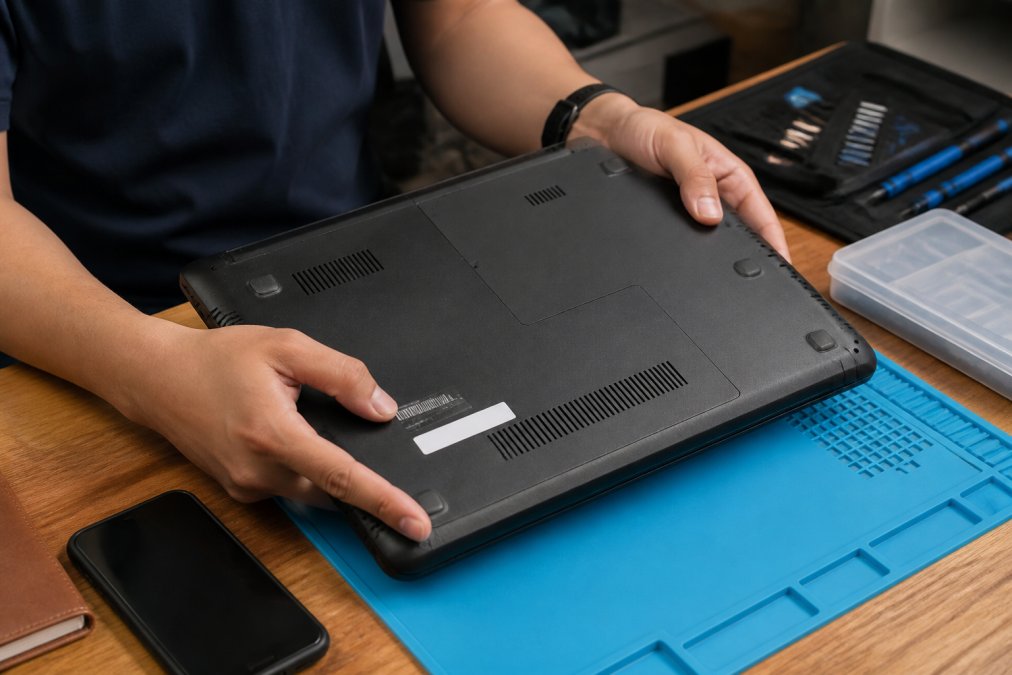
Locating the Serial Number on Different Devices
Where you look depends on the device type:
- Laptops: Bottom panel sticker or under the battery
- TVs: Back panel near the power port
- Kitchen appliances: Inside the door frame or behind the control panel
- Headphones and speakers: Under the ear cushion or inside the charging case
- Cameras: Bottom plate or inside the battery compartment
If the sticker is worn off, check the original box or the manufacturer's app.
Finding the IMEI on Mobile Devices
The IMEI is your phone's unique ID and works like a serial number for warranty checks. Find it three ways:
- Dial *#06# and the number appears on screen
- Open Settings, then About Phone, then Status
- Check the SIM tray or the back of the device
What Is Proof of Purchase for Warranty Claims?
Proof of purchase for warranty is any document showing what you bought, when, and from whom. Manufacturers use it to confirm your warranty start date; without it, many brands default to the manufacturing date, cutting months off your coverage.
Using Original Receipts and Digital Records
Paper receipts work, but digital records are safer. Most retailers email an order confirmation within minutes; save that email or download the PDF invoice from your account.
What to Do Without a Receipt
No receipt doesn't mean no warranty. Try these:
- Check your email for the order confirmation
- Log into the retailer's site and download the invoice
- Pull the warranty card from the box
- Contact the manufacturer with your serial number and purchase date
- Ask your bank for a transaction record as backup
Many support teams accept a bank record plus a serial number, not guaranteed, but worth the ask.
Step-by-Step: How to Verify Electronics Warranty Online
Here's the full process to verify electronics warranty online:
- Go to the manufacturer's official support page
- Find the warranty lookup or coverage status tool
- Enter your serial number or IMEI
- Confirm the model number matches your device
- Review the coverage status and expiration date
- Save a screenshot or PDF of the results
The whole check usually takes under five minutes. Screenshot everything. You'll want that record if you file a service claim later.
Checking Manufacturer Portals and Coverage Status
Every major brand runs its own warranty lookup. Search "[brand name] warranty check" and the official portal is usually the first result. Enter your serial number to see coverage status, expiration date, and terms.
Registering a New Product for Future Claims
Product registration takes two minutes and saves headaches later. You'll need your serial number, purchase date, and receipt. Registering links your device to your account, so future lookups pull up automatically.
Is Extended Warranty Worth It for Electronics?
Extended warranty value depends on the device, repair cost, and how you use it. For a $200 tablet, a plan rarely pays off; for a $1,500 laptop you carry daily, it often does.
Run the math before you buy:
- What's the device's replacement cost?
- What's the typical repair cost for common failures?
- How likely is accidental damage in your daily use?
- Does your credit card already extend the manufacturer warranty?
Checking Extended Protection Plan Status
If you bought an extended protection plan, verify it the same way you check the manufacturer warranty: log into the provider's portal, enter your serial number, and review coverage status.
Verifying Third-Party and Credit Card Warranty Coverage
Most guides stop at the manufacturer portal, but much U.S. electronics coverage sits with third parties, retailer plans, standalone insurers, and credit card benefit administrators, each with its own verification path.
-
Find the plan administrator's name on your original plan document or order confirmation email, it is usually not the retailer's name.
-
Go to that administrator's claims portal and create an account using the email you used at purchase.
-
Enter the device serial number and your plan or contract number.
-
Confirm the coverage window, deductible, and whether accidental damage is included.
-
Log into your card issuer's benefits portal, most major issuers route these through a benefits administrator.
-
Locate the "extended warranty" or "purchase protection" benefit page for the card you used.
-
Confirm the benefit is still active on that card and that the purchase qualifies (some cards exclude refurbished, used, or business purchases).
-
Register the claim or check status by uploading your receipt and the manufacturer warranty terms.
What to Do If Your Warranty Has Expired
An expired manufacturer warranty doesn't always mean no coverage. Check these in order:
- Credit card extension: If you paid with a qualifying card, the added year may still be active.
- Retailer plan: If you bought a protection plan, its term is separate and may run longer.
- State law: A handful of states extend implied warranty protections beyond the manufacturer's written term for certain consumer goods.
- Goodwill repair: Some manufacturers offer out-of-warranty repair programs or flat-rate service for known defects.
Troubleshooting Common Warranty Verification Problems
Verification errors happen, and most have simple fixes. Here are the most common.
Fixing 'Serial Number Not Found' Errors
1. Character confusion. The most common cause is a misread character. Serial numbers frequently mix letters and digits that look alike:
- O (letter) vs. 0 (zero)
- I (letter) vs. 1 (one) vs. l (lowercase L)
- S vs. 5
- B vs. 8
- Z vs. 2
Alternative Lookup Methods When the Portal Fails
If the portal still rejects your number, try these:
- Use the manufacturer's app. Many brands sync warranty status to the account tied to the device, bypassing the web form.
- Check the original box or warranty card. The card sometimes carries a registration or contract number that works when the serial does not.
- Call support with the serial and proof of purchase. An agent can often pull coverage from an internal system the public portal doesn't expose.
- Use the retailer's order history. Your account order page may show the warranty term the retailer recorded at purchase.
- Try a different browser or disable extensions. Ad blockers and privacy extensions occasionally block the lookup script.
Verifying Warranty for Second-Hand Electronics
Second-hand devices still carry the original manufacturer warranty as long as it hasn't expired, coverage follows the device, not the buyer. But you'll need the original purchase date to confirm the remaining period.
- Registration-locked plans. Some extended and retailer plans are tied to the original buyer's account and do not transfer.
- Non-transferable terms. A minority of manufacturers state in the written warranty that coverage applies only to the original purchaser. Read the warranty document, not the marketing page.
- Promotional or bundled coverage. Free coverage bundled with a carrier plan or subscription often ends when that subscription ends, regardless of who owns the device.
- Ask the seller for the serial number and, if available, the original receipt.
- Run the serial through the manufacturer's warranty lookup yourself, don't rely on the seller's screenshot.
- Note the expiration date and confirm it matches the seller's claim.
- Ask the seller to transfer any registered account or plan, if supported.
- Get the transfer in writing if the plan is a paid extended plan.
How to Submit an RMA Request and Use Your Coverage
An RMA request is how you actually use your warranty. Short for Return Merchandise Authorization, it starts a repair or replacement.
Here's the process:
- Log into the manufacturer's support portal
- Select your registered device
- Choose "Start a claim" or "Request RMA"
- Describe the issue and upload your proof of purchase
- Wait for the RMA number and shipping label
- Ship the device using the provided label
- Track the repair through your account dashboard
Frequently Asked Questions
How do I check if my warranty is still valid?
Go to the manufacturer's warranty lookup page and enter your device serial number or IMEI. The portal shows your coverage status, warranty period, and expiration date. If you registered the product when you bought it, your information is already on file. Without registration, you need proof of purchase showing the purchase date. Most manufacturers let you verify electronics warranty online in under two minutes once you have the right identifiers.
Can I check a warranty without a receipt?
Some manufacturers allow it. If your product was registered at purchase, the warranty is tied to the serial number in their system, so no receipt is needed. Without registration, you typically need proof of purchase. A credit card statement, order confirmation email, or bank record showing the purchase date and retailer often works as a digital record. Call customer support directly if the online portal rejects your claim without a receipt.
What information do I need to verify an electronics warranty?
You need three things: the device serial number or IMEI, the purchase date, and proof of purchase. The serial number is usually on the device itself, the original box, or in device settings under 'About' or 'Status.' The purchase date comes from your receipt, order confirmation, or bank statement. Having the model number helps too. Most online portals ask for the serial number first, then request purchase details if the product was not registered.
Does an extended warranty show up in online manufacturer portals?
Not usually. Manufacturer portals show the standard warranty only. Extended protection plans are administered by third parties like retailers, insurers, or warranty companies, so you check coverage status through the provider that sold you the plan. Keep your plan documents and policy number handy. If you bought the plan through a retailer, log into your account dashboard there. If it was a separate insurer, use their online portal or call their claims line.
Warranty verification shouldn't feel like detective work. ShopVerse.life makes it easier by stocking electronics from brands with clear warranty terms, plus 24/7 online support if you hit a snag. Every order includes a digital receipt you can download anytime, and our money-back guarantee covers you if something arrives damaged. Get started with ShopVerse.life and keep your coverage records in one place from day one.