

Is a Kneeling Chair Better Than an Office Chair? 2026
Table of Contents
- Kneeling Chair vs. Office Chair: The 2026 Verdict
- How Kneeling Chairs Affect Your Spine and Posture
- Kneeling Chair Risks: Knees, Neck, and Pressure Points
- Kneeling Chair vs Ergonomic Chair for Long Hours
- How to Transition to a Kneeling Chair Without Injury
- Who Should Avoid Kneeling Chairs?
- Final Recommendation: Which Chair Should You Buy?
- Frequently Asked Questions
Last Updated: September 5, 2026
Kneeling Chair vs. Office Chair: The 2026 Verdict
A kneeling chair is a type of ergonomic seating that positions your hips at a more open angle than a standard office chair, shifting your weight onto your shins to encourage an upright posture. While research shows kneeling chairs excel at maintaining lumbar curvature, they are not a universal replacement for a traditional ergonomic office chair.
The 2026 consensus among ergonomics experts is that kneeling chairs work best as a supplementary tool for short-to-medium sessions, not as your only seat for eight-hour workdays. Below, we break down what the science says about your spine, the real risks to your knees and neck, and how to test one safely before committing to a purchase.
How Kneeling Chairs Affect Your Spine and Posture
A kneeling chair works by tilting your pelvis forward, which reduces the posterior pelvic rotation that typically causes you to slump in a standard chair. This forward tilt promotes a neutral spine position and increases the angle at your hips, which is why many users report immediate relief from lower back discomfort.
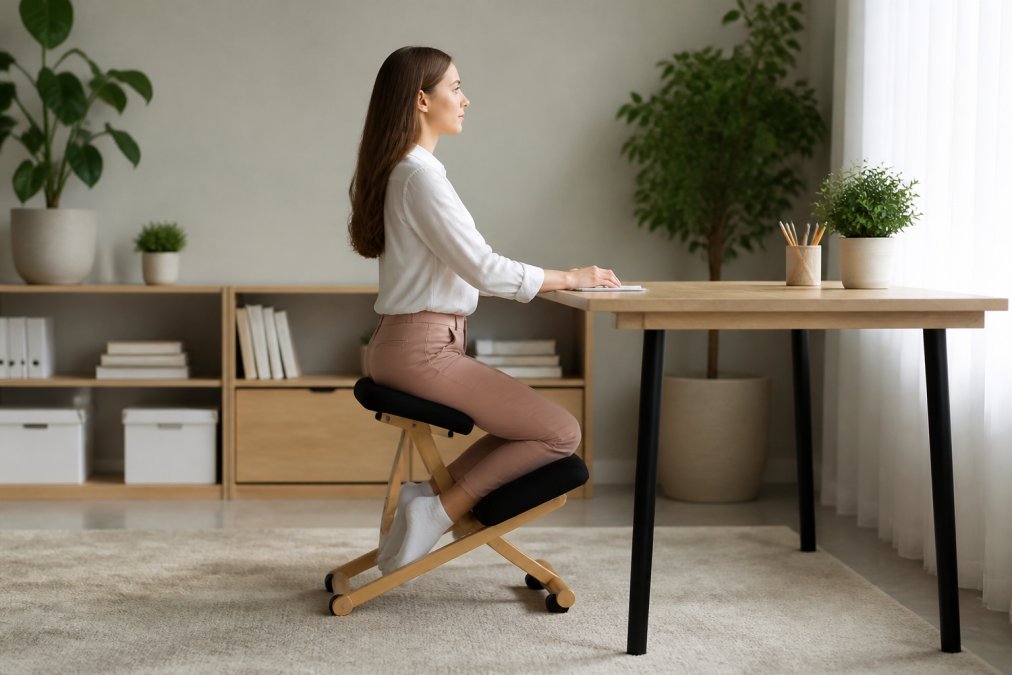
The biomechanical advantage is real. Research published in PubMed's comparison of sagittal lumbar curvature (2008) found that kneeling chairs maintained standing lumbar curvature to a greater extent than standard computer chairs when set at a +20 degree inclination. A more recent assessment from the National Library of Medicine's PMC database (2026) confirms that kneeling chairs promote lumbar lordosis, the natural inward curve of your lower back.
What Research Says About Lumbar Curvature
The core benefit of a kneeling chair is its ability to preserve your spine's natural S-curve. Studies consistently show that kneeling chairs significantly reduce posterior pelvic rotation compared to standard office chairs, as documented in ergonomic research on kneeling chair effectiveness (2008).
However, the research carries an important caveat. The same PubMed study noted that while lumbar curvature improves, kneeling chairs may encourage poor neck posture, specifically a forward head position. The steep angle of the seat can push your head in front of your shoulders if you don't actively maintain cervical spine alignment.
Kneeling Chair Risks: Knees, Neck, and Pressure Points
The main trade-off for better lower back support is increased pressure on your knees and shins. Because your body weight rests on the padded shin supports, the chair places significant load on the knee joint.
Physical therapy communities have raised specific concerns about this. The seating angle can place excessive pressure on the posterior cruciate ligament, the ligament that prevents your shinbone from sliding backward. For anyone with existing knee conditions, this pressure can quickly turn into joint pain.
When your hips are tilted forward at 20 to 30 degrees, your upper body naturally wants to compensate. Without conscious effort, your neck can drift forward, trading lower back pain for cervical spine tension. This is why ergonomic specialists recommend using a kneeling chair for short intervals rather than as a full-time replacement.
Kneeling Chair vs Ergonomic Chair for Long Hours
For eight-hour workdays, a standard ergonomic office chair with adjustable lumbar support, armrests, and seat height remains the safer choice. Kneeling chairs simply don't offer the adjustability or the backrest needed to support sustained static loading.
A kneeling chair is best used in rotation. Experts at BTOD.com's ergonomic seating analysis recommend using them for short-to-medium sessions to supplement your regular chair, not as a full-time replacement. This hybrid approach aligns with the 2026 industry shift toward movement-based seating, where the goal is variation rather than static sitting in any single position.
| Feature | Kneeling Chair | Ergonomic Office Chair |
|---|---|---|
| Lumbar curvature | Excellent at +20 degree tilt | Good, adjustable support |
| Knee pressure | High, on shins and ligaments | Minimal |
| Neck posture risk | Moderate, forward head possible | Low |
| Adjustability | Limited seat angle only | Height, tilt, armrests, lumbar |
| Best use duration | 30-90 minute sessions | Full workday |
How to Transition to a Kneeling Chair Without Injury
The most common reason for abandoning a kneeling chair is discomfort from an improper setup and an overly aggressive transition schedule. Here is a practical, step-by-step guide to ensure your body and workstation are ready.
Step 1: Pre-Use Assessment and Setup
A kneeling chair raises your hip height by 2 to 4 inches compared to a standard chair, so your desk and monitor need to be repositioned to maintain proper ergonomic angles.
- Desk Height: Your desk must be high enough so your elbows are at a 90-degree angle when your hands are on the keyboard. If it is adjustable, raise it; for a fixed-height desk, use a keyboard tray or monitor stand to achieve the correct alignment.
- Monitor Height: The top of your monitor should be at or slightly below eye level. Because your torso is more upright in a kneeling chair, you will likely need to raise your monitor by 1 to 3 inches compared to your standard chair setup. Failing to do so is the primary cause of the 'forward head posture' often associated with kneeling chairs.
- The 90-90-90 Rule: When seated, aim for a 90-degree angle at your elbows, a 90-degree angle at your hips (the angle between your torso and thighs), and a 90-degree angle at your knees. The shin pads should support your lower legs without digging into the back of your knees.
Step 2: The Gradual Adaptation Schedule
Your muscles, ligaments, and joints need time to adapt to the new biomechanical load. Rushing this process is a recipe for knee and hamstring pain. Follow this conservative schedule:
- Week 1 (Adaptation): Use the chair for a single 15-minute session each day. Focus on maintaining a tall spine and relaxed shoulders. Do not use it if you feel any sharp pain.
- Week 2 (Building Tolerance): Increase to two 20-minute sessions, separated by at least a few hours. Alternate with your standard office chair. Pay close attention to any pressure points on your shins.
- Week 3 (Extended Sessions): You may extend one of your sessions to 30-45 minutes. The total daily usage should not exceed 90 minutes.
- Week 4 and Beyond (Maintenance): You can now use the chair for sessions of up to 60 minutes, but it is generally recommended to cap total daily use at 2 hours. The goal is to use it as an active sitting tool, not a full-time seat.
Step 3: In-Seat Micro-Breaks
Even during a 30-minute session, you must take micro-breaks to reset your posture and relieve pressure.
- Every 10 Minutes: Shift your weight slightly from one shin to the other.
- Every 20 Minutes: Perform a chin tuck (pull your head back to align your ears with your shoulders) and roll your shoulders back and down.
- Every 30 Minutes: Stand up, stretch your legs, and walk around for at least 60 seconds. This is non-negotiable for preventing joint stiffness and maintaining circulation.
By following this methodical approach, you can determine if a kneeling chair is a sustainable addition to your workspace without causing the very joint pain it is designed to prevent.
Who Should Avoid Kneeling Chairs?
The biomechanics of a kneeling chair, which place a significant load on the shins and knees while forcing a fixed pelvic tilt, can be actively harmful for individuals with specific underlying conditions. This section provides a condition-specific breakdown based on orthopedic and physical therapy principles.
Lower Body Conditions That Are Contraindicated
- Patellofemoral Pain Syndrome (Runner's Knee): The 20- to 30-degree flexion of the knee joint on the shin pads increases the compressive forces on the patella against the femur. For individuals with patellofemoral pain, this sustained compression can exacerbate irritation of the articular cartilage and surrounding soft tissues. Most physical therapists advise against this seating position for patients with active patellofemoral issues.
- Meniscus Tears: The fixed, flexed position of the knee limits the natural rotation and gliding of the meniscus. For those with a history of a torn meniscus, especially an untreated tear, the static load can cause pinching or increased pain. The lack of ability to shift weight and extend the knee fully is a primary concern.
- Hip Bursitis (Trochanteric Bursitis): The wide stance required to sit on a kneeling chair places the hips in a position of external rotation and abduction. This posture can increase tension on the iliotibial (IT) band and compress the bursa sac on the outside of the hip, leading to significant discomfort for those with bursitis.
- Posterior Cruciate Ligament (PCL) Injury: As mentioned earlier, the design of the chair places direct pressure on the tibial tuberosity (the shinbone). In a healthy knee, this load is distributed. However, if the PCL is sprained or torn, this force directly stresses the compromised ligament, potentially leading to increased laxity or pain. Anyone with a history of a PCL injury should avoid this chair entirely.
- Severe Ankle Stiffness or Plantar Flexion Contracture: The position requires your ankles to be in a state of significant plantarflexion (pointed downward). If you have limited dorsiflexion (the ability to pull your toes up) or a condition like Achilles tendinitis, the sustained angle can cause cramping and strain in the calf and Achilles tendon.
Systemic and Occupational Factors
Beyond specific joint pathologies, other factors can make a kneeling chair a poor choice.
- Pregnancy: The forward pelvic tilt and increased pressure on the abdomen and shins are generally not recommended during pregnancy, particularly in the later stages. The shift in the center of gravity and potential for reduced circulation make a standard, adjustable chair a safer option.
- Restricted Mobility in the Spine: Individuals with conditions like ankylosing spondylitis or severe degenerative disc disease may find the fixed forward tilt of the pelvis to be painful. The chair does not allow for the subtle adjustments in spinal position that a dynamic office chair with a backrest permits.
- Occupational Needs for Mobility: As noted in research on seating for clinical professionals, the kneeling chair's design significantly restricts the ability to pivot, reach, and move. For professionals who need to turn frequently, such as dentists, surgeons, or even designers working on large physical drafting tables, the lack of a swivel base and the fixed position of the lower body create a functional hazard and increase the risk of strain from awkward reaching.
For those who cannot use a kneeling chair, the focus should shift to optimizing a standard chair's setup and incorporating movement breaks. A high-quality ergonomic chair with proper lumbar support, combined with a routine of standing and stretching, often provides the necessary relief without the joint stress associated with kneeling chairs.
Final Recommendation: Which Chair Should You Buy?
For most professionals, the answer is both. A kneeling chair is better for short, focused sessions where you need to maintain lumbar curvature and avoid slouching. But for long hours of typing, reading, or video calls, a fully adjustable ergonomic office chair remains the foundation of a healthy workstation.
The key is variety. Static sitting in any chair, no matter how ergonomic, contributes to musculoskeletal issues over time. Alternate between your kneeling chair and your standard chair throughout the day, and listen to your body for signs of knee strain or neck tension.
If you're looking to improve your sitting posture without replacing your entire setup, the Posture Corrector Back Brace from ShopVerse.life offers a practical complement. Priced at $64.48, this adjustable back support helps align your shoulders and upper spine during the hours you spend in a traditional office chair, addressing the forward head position that kneeling chairs can sometimes encourage.

Frequently Asked Questions
Can you use a kneeling chair for an 8-hour workday?
No. Research indicates kneeling chairs work best for short-to-medium sessions, not as a full-time replacement. The fixed forward angle can strain knee ligaments and encourage forward head posture over extended periods. Use a kneeling chair for 1-2 hours at a time, then switch to a standard ergonomic chair. This hybrid approach gives you the lumbar benefits without the joint stress of prolonged static kneeling.
Are kneeling chairs actually better for posture?
Studies show kneeling chairs maintain lumbar curvature better than standard office chairs by reducing posterior pelvic rotation. However, they can also promote forward head posture, which creates neck strain. So they are better for lower back alignment but potentially worse for the cervical spine. The kneeling chair's benefit depends on your specific posture problem and how consistently you maintain a neutral head position while sitting.
Who should avoid using a kneeling chair?
Anyone with existing knee problems, including meniscus tears, arthritis, or recent surgery, should avoid kneeling chairs. The design places significant pressure on the patella and posterior cruciate ligament. People with poor ankle mobility may also struggle with the fixed angle. Pregnant women and individuals with balance issues face higher fall risks. If you have any lower-body joint concerns, consult a physical therapist before trying one.
How does a kneeling chair affect core strength?
Kneeling chairs promote active sitting, which requires more core engagement than a standard chair with a backrest. The forward-tilting angle shifts weight distribution and forces your abdominal muscles to work continuously to maintain an upright position. However, study findings on muscle activity remain mixed. Some research shows increased core activation, while other studies find similar muscle activity to traditional chairs once users adapt.
Choosing the right seating comes down to understanding your specific physical needs and work patterns. A kneeling chair offers proven benefits for lumbar support but introduces real risks to your knees and neck that require careful management. Explore the curated selection of posture and wellness products at ShopVerse.life to build a workstation that supports your body through every workday. Get started with ShopVerse.life and find the ergonomic support that fits your routine.