

Smart Plugs for Old Lamps: A Complete Guide
Table of Contents
- How Smart Plugs Work With Old Lamps
- Smart Plug vs Smart Bulb for Lamps: Which Is Right for You
- Compatibility Requirements: Checking Your Old Lamp
- Smart Plug Compatibility With Old Wiring and Switches
- Setting Up Voice Control and Automation
- Troubleshooting Smart Plugs With Lamps
- Safety Considerations for Smart Plugs and Antique Lamps
- Conclusion
Last Updated: August 29, 2026
How Smart Plugs Work With Old Lamps
Smart plugs act as intermediaries between your power outlet and lamp, allowing remote control via smartphone app, voice command, or automated schedule. The lamp itself remains unchanged; the smart plug handles all intelligence. When you command the plug on, it completes the electrical circuit and sends power to the lamp. When you command it off, the plug breaks that circuit. No modifications to the lamp's internal wiring are necessary, which is why smart plugs work with virtually any lamp that has a standard on/off switch.
According to recent data, 51.4% of households in the United States now have at least one smart home device (census.gov). Most standard smart plugs are rated for 15 amps (1,800 watts), more than sufficient for any household lamp, which typically draw between 60 and 300 watts (fcc.gov). The real advantage emerges when you integrate your lamps into a broader smart home ecosystem. Modern smart plugs compatible with Matter protocol work seamlessly across Alexa, Google Home, and Apple Home platforms, allowing you to include your grandmother's antique brass lamp in automated lighting scenes, set schedules that turn it on at sunset, or voice-control it from anywhere in your home.
Smart Plug vs Smart Bulb for Lamps: Which Is Right for You
Both approaches work, but they solve different problems with different trade-offs. A smart bulb replaces the traditional bulb with an intelligent one that connects directly to your Wi-Fi or Zigbee network, offering full dimming control, color adjustment, and precise scheduling. However, smart bulbs cost more per bulb and lose functionality if the bulb burns out.
A smart plug sits between the outlet and lamp, offering on/off control and energy monitoring on many models. You cannot dim the light unless the lamp has a built-in dimmer. The trade-off: smart plugs are cheaper, work with any lamp regardless of age, and one plug controls the entire fixture.
| Scenario | Smart Plug | Smart Bulb |
|---|---|---|
| Vintage/antique lamp | Ideal, no modifications needed | Requires compatible socket |
| Multiple lamps in one room | One plug per lamp; simpler setup | One bulb per lamp; higher cost |
| Dimming control | Not possible (unless lamp has built-in dimmer) | Full dimming available |
| Energy monitoring | Available on premium models | Limited to bulb-level data |
| Bulb replacement | Plug remains; bulb lifespan independent | Bulb failure means loss of smart features |
| Budget-conscious setup | Best option, pricing depends on quantity, dates, and delivery | Pricing depends on quantity, dates, and delivery |
For most people with older lamps, smart plugs win on practicality and cost. You're not modifying the lamp, replacing bulbs prematurely, or adding complexity. Smart bulbs make sense if you want dimming, color control, or you're building a new setup with modern fixtures from the start.
Compatibility Requirements: Checking Your Old Lamp
Before you buy a smart plug, verify that your lamp will actually work with one. The primary requirement is simple: your lamp must have a toggle switch or mechanical switch that stays in the "on" position. When power returns after an outage or the smart plug cycles off and back on, the lamp needs to resume its previous state automatically.
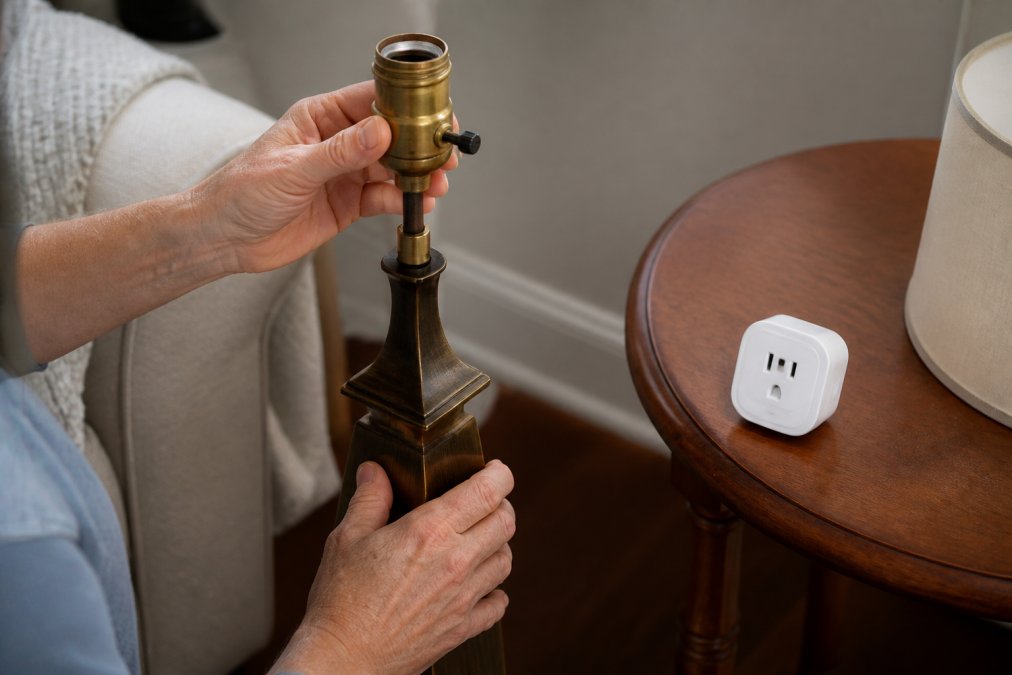
Examine your lamp's physical switch. If it's a simple toggle (up/down) or a rotary dial that clicks into an "on" position, you're compatible. Most vintage floor lamps, desk lamps, and table lamps fall into this category. However, if your lamp uses a momentary push-button switch that requires you to hold it down to keep the light on, it won't work with a smart plug. When the smart plug cuts power and restores it, the momentary switch returns to its default "off" position, leaving your lamp dark.
Check the lamp's condition next. Old wiring can deteriorate. Look for visible damage to the cord, cracks in the socket, or loose connections. Test it with a standard outlet first before adding a smart plug. Damaged wiring poses a fire hazard.
Verify the lamp's power requirements. Most household lamps draw between 40 and 300 watts. Standard smart plugs handle up to 1,800 watts safely. If your lamp's bulb socket shows a wattage limit, ensure you're using bulbs within that range.
Finally, assess the physical fit. Some smart plugs are bulky and may block adjacent outlets on a power strip. Measure the space to ensure the plug fits without creating a safety hazard.
Smart Plug Compatibility With Old Wiring and Switches
Old lamps often come with original wiring and switching mechanisms that weren't designed for smart home integration. Understanding these legacy systems determines whether a smart plug will function reliably.
Understanding Toggle vs. Momentary Switches
A toggle switch or rotary dial maintains its position; when you flip it to "on," it stays on until you manually flip it off. When a smart plug cycles power, the toggle switch remains in the "on" position, so the lamp turns back on automatically.
A momentary push-button switch activates only while you're pressing it. Release the button, and it springs back to the off position. If your lamp has a momentary switch, a smart plug cannot sustain the "on" state because the switch defaults to "off" whenever power cycles.
Identifying your switch type takes seconds. Look at the lamp's physical switch. Does it stay in the position you move it to, or does it spring back? If it stays, you have a toggle switch and you're compatible. If it springs back, you have a momentary switch and a standard smart plug won't work. smart home appliances.
Bypassing Physical Switches for Full Automation
If your lamp has a momentary switch or you want to prevent manual use entirely, you can bypass the physical switch by routing power directly to the lamp's internal wiring. This approach works only if you're comfortable with basic electrical work and willing to potentially void any warranty or damage an antique piece.
For most people, this is unnecessary. If your lamp has a toggle switch, a smart plug works perfectly without modification. If it has a momentary switch, use a smart bulb instead or replace the lamp entirely.
Setting Up Voice Control and Automation
Once your smart plug is installed and paired to your home network, voice control and automation become immediate. Download the smart plug manufacturer's app and create an account. Most plugs require you to connect to your home Wi-Fi network during setup, typically by holding a button on the plug until an LED blinks, then selecting your network and entering your password. This takes about 5 minutes.
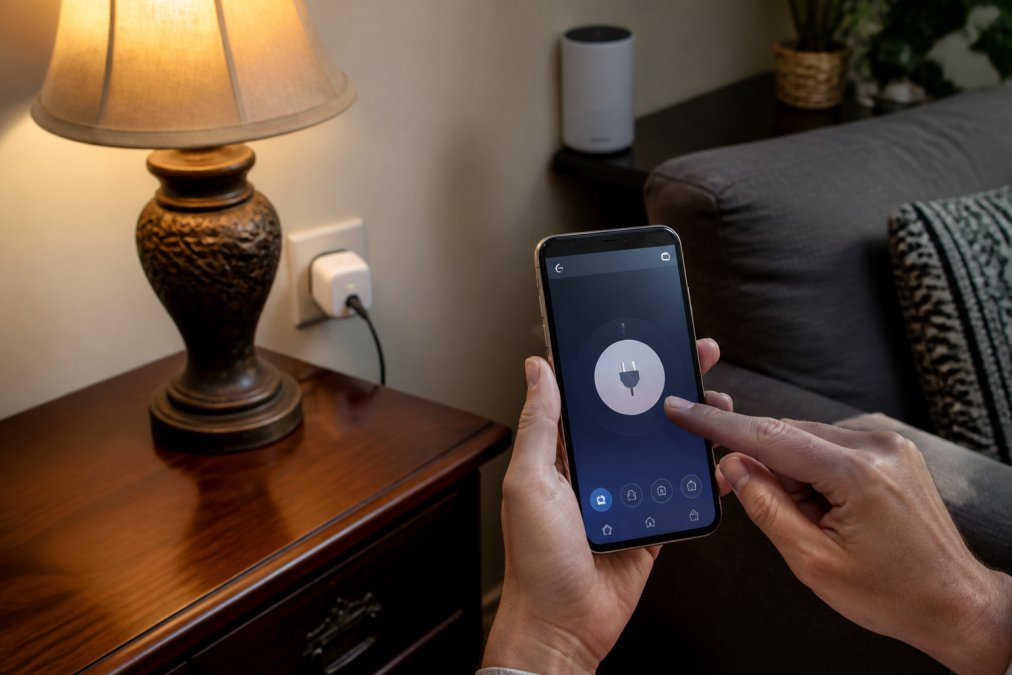
Name your lamp something descriptive in the app. "Living room floor lamp" is better than "Plug 1." Once named, you can control the lamp through the app directly by tapping the on/off toggle.
For voice control, link the smart plug to your voice assistant. If you use Alexa, enable the manufacturer's skill in the Alexa app and link your accounts. Google Home and Apple Home have similar processes. After linking, you can say "Alexa, turn on the living room floor lamp" and the plug responds within 2-3 seconds.
Automation and scheduling are where smart plugs shine. Most apps allow you to create routines: turn the lamp on at 6 PM every weekday, turn it off at 11 PM, or activate it when you arrive home using geolocation. Matter-compatible smart plugs offer more reliable automation because they use a local mesh network rather than relying solely on cloud connectivity.
Energy monitoring, available on many smart plugs, shows real-time power consumption and helps identify which fixtures are power guzzlers.
Troubleshooting Smart Plugs With Lamps
Smart plugs are reliable, but connectivity and configuration issues do occur. Most problems resolve quickly once you understand what's happening.
The most common issue: the lamp doesn't turn on when you command it through the app. First, verify the lamp is plugged into the smart plug and the smart plug is plugged into a working outlet. Check the app; is the plug showing as "online" or "offline"? If offline, restart the plug by unplugging it for 10 seconds, then plugging it back in. Wait 30 seconds for it to reconnect to your network.
If the plug remains offline, your Wi-Fi signal may be weak. Smart plugs typically need a signal strength of at least -70 dBm to maintain reliable connection (ieee.org). Move your router closer or use a Wi-Fi extender to improve coverage.
The lamp turns on but doesn't respond to voice commands. Re-enable the manufacturer's skill or app in your voice assistant's settings, sign out completely, and sign back in. Then test the connection with the app first before trying voice commands again.
Intermittent connectivity often indicates a network congestion issue or a plug placed too far from your router. Reduce the number of devices on your Wi-Fi network if possible, or move the plug closer to your router to test. If this resolves the problem, a Wi-Fi extender or mesh network upgrade may be necessary.
The lamp turns on after a power outage but the physical switch is in the "off" position. This is correct behavior; the lamp defaults to its last known state (on) when power returns, regardless of the switch position.
Safety Considerations for Smart Plugs and Antique Lamps
Safety is non-negotiable when adding smart plugs to older fixtures. Antique and vintage lamps present specific risks that modern lamps typically don't.
Old wiring deteriorates over time. The insulation around copper conductors becomes brittle, cracks, or peels away. Before using any vintage lamp with a smart plug, inspect the entire cord for visible damage, discoloration, or brittleness. If the insulation looks compromised, the lamp needs rewiring by a qualified electrician or should be retired.
Socket condition matters. Old brass or ceramic sockets can corrode or develop loose connections. A loose connection generates heat, which can ignite nearby materials. Test the lamp thoroughly with a standard outlet first, and observe whether the socket or cord gets warm during normal use.
Never exceed the smart plug's rated amperage. Most household smart plugs are rated for 15 amps at 120 volts (1,800 watts). Verify the total load doesn't exceed the plug's rating.
Avoid using smart plugs with space heaters, air conditioning units, or any appliance with a heating element or motor. These devices draw high current and can damage the smart plug's internal circuitry.
Keep the smart plug away from moisture. If your lamp is in a bathroom or near a sink, ensure the outlet and plug are protected from water exposure.
Finally, use smart plugs only with UL-listed or certified models. Cheap, uncertified smart plugs cut corners on safety components.
Automating older lamps with smart plugs is straightforward when you understand the compatibility requirements and limitations. The approach works best for lamps with toggle switches, reasonable electrical condition, and power consumption within standard ranges. At ShopVerse.life, we curate smart home products that bring older fixtures into modern ecosystems without unnecessary complexity. We provide fast shipping, secure payments, and dedicated support to help you discover the perfect gift or upgrade for your home. Experience smart living with our carefully selected collection of top-rated items.
=== FAQ ANSWERS (audit these too, same rules) ===
[1] Q: Do smart plugs work with lamps that have mechanical switches? A: Yes, smart plugs work with lamps that have toggle switches (the standard on/off switches). However, lamps with momentary push-button switches present a challenge because they don't stay in a fixed position. With momentary switches, the smart plug can turn the lamp on, but the physical button must remain pressed to keep it on. For full automation, you'll need to either bypass the physical switch or use a smart bulb instead.
[2] Q: What should you not plug into a smart plug? A: Avoid plugging high-load appliances into smart plugs, as they're typically rated for 15A (1800W) maximum. Never use them with space heaters, heavy-duty equipment, or devices that draw excessive power, as this creates fire hazards. Additionally, don't plug in devices with soft electronic buttons that require power to resume operation after a power cycle, as smart plugs may interrupt the power flow unexpectedly. Always check the product's amperage and wattage rating before connecting any device.
[3] Q: Can you turn any lamp into a smart lamp with a smart plug? A: Most traditional lamps can be turned into smart lamps using a smart plug, but there are limitations. Lamps with toggle switches work best because the smart plug controls the power directly. However, lamps with momentary push-button switches or those requiring constant manual adjustment won't fully automate. Additionally, older lamps with damaged wiring or unstable fixtures pose safety risks. LED and incandescent bulbs are both compatible, but check your lamp's condition and switch type before purchasing a smart plug.
[4] Q: Are there safety concerns when using smart plugs with antique lamps? A: Yes, older lamps may have deteriorated wiring, loose connections, or corroded sockets that increase fire risk when connected to a smart plug. Before use, inspect the lamp for visible damage, fraying wires, or loose components. Ensure the plug and outlet are clean and make proper contact. If you notice any overheating, unusual smells, or flickering, disconnect the lamp immediately and discontinue use.
Frequently Asked Questions
Do smart plugs work with lamps that have mechanical switches?
Yes, smart plugs work with lamps that have toggle switches (the standard on/off switches). However, lamps with momentary push-button switches present a challenge because they don't stay in a fixed position. With momentary switches, the smart plug can turn the lamp on, but the physical button must remain pressed to keep it on. For full automation, you'll need to either bypass the physical switch or use a smart bulb instead.
What should you not plug into a smart plug?
Avoid plugging high-load appliances into smart plugs, as they're typically rated for 15A (1800W) maximum. Never use them with space heaters, heavy-duty equipment, or devices that draw excessive power, as this creates fire hazards. Additionally, don't plug in devices with soft electronic buttons that require power to resume operation after a power cycle, as smart plugs may interrupt the power flow unexpectedly. Always check the product's amperage and wattage rating before connecting any device.
Can you turn any lamp into a smart lamp with a smart plug?
Most traditional lamps can be turned into smart lamps using a smart plug, but there are limitations. Lamps with toggle switches work best because the smart plug controls the power directly. However, lamps with momentary push-button switches or those requiring constant manual adjustment won't fully automate. Additionally, older lamps with damaged wiring or unstable fixtures pose safety risks. LED and incandescent bulbs are both compatible, but check your lamp's condition and switch type before purchasing a smart plug.
Are there safety concerns when using smart plugs with antique lamps?
Yes, older lamps may have deteriorated wiring, loose connections, or corroded sockets that increase fire risk when connected to a smart plug. Before use, inspect the lamp for visible damage, fraying wires, or loose components. Ensure the plug and outlet are clean and make proper contact. If you notice any overheating, unusual smells, or flickering, disconnect the lamp immediately and discontinue use.
This article was written using GrandRanker