

Why You Need a Smart Kitchen Scale for Baking
Table of Contents
- Why Precision Matters More Than You Think in Baking
- The Benefits of Weighing Ingredients for Baking
- Digital vs Smart Kitchen Scale: What's the Difference?
- How to Use a Kitchen Scale for Baking (Step by Step)
- Features That Separate a Good Smart Scale From a Frustrating One
- Smart Scale Apps, Privacy, and Smart Home Integration
- Troubleshooting Common Smart Kitchen Scale Problems
- Conclusion
- Frequently Asked Questions
Last Updated: September 14, 2026
Why Precision Matters More Than You Think in Baking
Baking is chemistry, and chemistry does not forgive improvisation. A smart kitchen scale is the single most effective tool for eliminating measurement error. This guide explains why weighing matters, how smart scales differ from basic digital models, and which features are worth paying for.
Cooks who eyeball a cup of flour can be off by 20% or more depending on how they scoop, and that variance compounds across every ingredient, producing flat cookies, breads that refuse to rise, and dense cakes (Flour Tests : USDA ARS).
Unlike savory cooking, baking depends on fixed ratios between flour, water, fat, sugar, and leavening agents (pubmed.ncbi.nlm.nih.gov). Change one ratio and you change the chemical reaction, which is why professional bakers abandoned volume measurement decades ago.
The Benefits of Weighing Ingredients for Baking
The core benefit of weighing ingredients is reproducibility: a gram measurement produces the same result every time, while a cup does not. Many home bakers learn this the hard way after a recipe works once and fails the next three attempts.
Weighing also speeds up your workflow: place a bowl on the scale, press tare, add flour, press tare, add sugar. No measuring cups to wash, no leveling with a knife, fewer dishes.
Volume vs Mass: Why Cups Fall Short
Volume measures the space an ingredient occupies; mass measures how much of it you actually have. Flour is the classic problem: a cup of sifted flour and a cup of packed flour are not the same amount, because of how much air sits between the particles.
Professional recipe development relies on mass for this reason: grams remove the packing variable entirely.
How Ingredient Density Changes Everything
Ingredient density is the mass of an ingredient per unit of volume, and it varies wildly. A cup of honey weighs far more than a cup of flour; a cup of chopped nuts weighs less than a cup of whole nuts; packed brown sugar weighs more than loosely spooned.
This is where unit conversion gets dangerous: converting a cup-based recipe to grams with a single universal factor produces errors, because the factor only holds for one ingredient at one density. Weighing directly sidesteps the problem.
Digital vs Smart Kitchen Scale: What's the Difference?
A digital scale displays weight on a screen. A smart scale adds connectivity: Bluetooth, app synchronization, and the ability to log, convert, and track measurements over time. The sensor is often similar; the difference is what happens to the data afterward.
| Feature | Basic Digital Scale | Smart Kitchen Scale |
|---|---|---|
| Weight display | Digital display, single unit | Digital display, multi-unit |
| Tare function | Standard | Standard plus app-assisted |
| Connectivity | None | Bluetooth or Wi-Fi |
| App sync | No | Yes, logs each session |
| Nutrition tracking | No | Yes, per-ingredient breakdown |
| Unit conversion | Manual button | Automatic in app |
When a Basic Digital Scale Is Enough
A basic digital scale is enough if you weigh the same handful of recipes, never track nutrition, and do not care about logging. A simple model with a tare function, reasonable capacity, and a stable platform will do the job for years.
The limitation: basic scales give you a number and nothing else. If you want that number to mean something across sessions, you do the bookkeeping yourself.
What Smart Connectivity Adds to the Counter
Smart connectivity turns the scale into part of a larger system. A connected scale pushes each weight to an app, where it is stored against a recipe, converted between grams and ounces, and totaled for nutritional tracking, removing a step that otherwise happens on paper or in a separate app.
The second gain is consistency over time: if your app logs last month's dough weight and hydration, you can compare this month's result against it directly. That is baking science applied at home, not guesswork.
How to Use a Kitchen Scale for Baking (Step by Step)
Using a kitchen scale for baking takes about ten seconds per ingredient once you build the habit. This sequence works for any recipe written in grams or ounces.
- Place the scale on a flat, stable surface away from the stove.
- Power it on and confirm the unit is set to grams.
- Set your empty bowl on the platform and press tare to zero it out.
- Add the first ingredient slowly until the display reaches the target weight.
- Press tare again before adding the next ingredient.
- Repeat for each ingredient, taring between additions.
- Use the app to log the session if you want a record for next time.
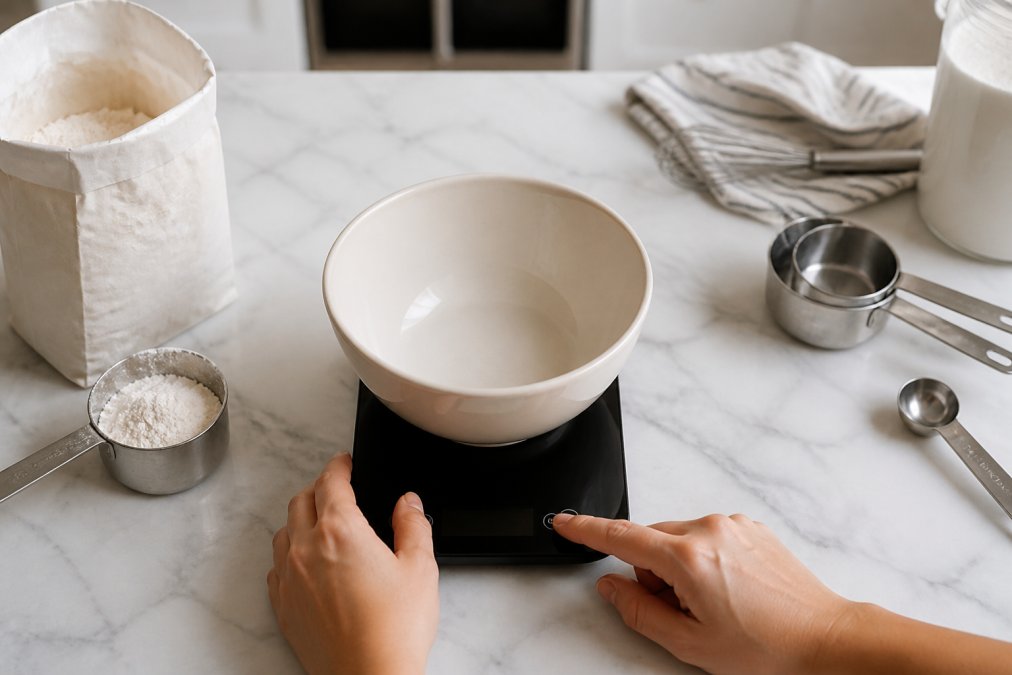
Expected Result: A single bowl containing every dry ingredient at the exact weights the recipe specifies, with no measuring cups used.
Tare Function and Unit Conversion Basics
The tare function subtracts the weight of whatever is on the platform, resetting the display to zero, the feature that makes one-bowl mixing possible.
Unit conversion is the second essential. Most smart scales toggle between grams, ounces, and pounds with a button, and their apps convert automatically when a recipe uses a different system than your default, a real time-saver if you bake from sources on both sides of the Atlantic. Precision in these measurements removes the guesswork that often leads to uneven results, ensuring you bake consistent cookies every time you step into the kitchen.
Features That Separate a Good Smart Scale From a Frustrating One
Smart scale spec sheets look identical across brands: one-gram resolution, a few pounds of capacity, a glass platform, auto-off. The differences that matter are mechanical, and they show up in how the load cell behaves under real conditions, a bowl of dough, a drizzle of honey, a counter above a running dishwasher.
Resolution vs. Accuracy: Not the Same Thing
Resolution is the smallest increment the display will show; accuracy is how close that number is to the true weight. A scale can read to 0.1 grams and still be wrong by 5 grams if the load cell is not calibrated. For baking, one-gram resolution is the practical floor. What you want is a scale that holds its reading steady when you stop adding and returns to zero cleanly after you remove the bowl; one that drifts upward while sitting still will quietly ruin a recipe.
Why Load Cells Fail (and How to Avoid It)
A load cell is a metal bar with strain gauges bonded to it. When weight bends the bar, the gauges change resistance, and the scale converts that to a number. Two things kill load cells: overload and moisture. Overload happens when you drop a heavy bowl onto the platform or exceed the rated capacity, the bar bends past its elastic limit and never returns true. Moisture happens when flour dust or liquid seeps into the housing and corrodes the gauge wiring. This is why the platform should always be the contact point, never the bare sensor housing, and why you should never store a scale where steam collects.
The Specs That Matter, Ranked
- Accuracy and stability: one-gram resolution, holds steady, returns to zero. Test it with a known weight if the manufacturer includes one.
- Capacity: match it to your largest single batch. A full batch of high-hydration dough can run several pounds; a scale rated to 11 pounds covers most home baking, while a 5-pound scale will frustrate anyone who bakes bread (Baking up a Whole-Grain Rice Bread : USDA ARS).
- Platform size: wide enough that your biggest bowl sits flat. An overhanging bowl puts torque on the load cell and produces readings that drift as the bowl shifts.
- Response time: a scale that takes two seconds to settle after each addition slows a multi-ingredient recipe to a crawl. Faster is better, but not at the cost of stability.
- Auto-off window: long enough to not interrupt you mid-recipe. A short timer that shuts the scale down while you are measuring is worse than no timer at all.
- Calibration access: user-accessible, not factory-only. A known calibration weight lets you verify accuracy over years, not just on day one.
The Scientific Reason Volume Fails
Ingredient density is the mass of an ingredient per unit of volume, and it is why cups are unreliable. Flour particles do not pack uniformly, sifting, scooping, and settling all change how much air sits between them, so a cup of sifted flour and a cup of packed flour can differ by a meaningful margin. Mass sidesteps this because it measures the ingredient, not the space it occupies. That is why a scale's accuracy matters more than any app feature: the number is the recipe.
Smart Scale Apps, Privacy, and Smart Home Integration
Most smart scale coverage stops at "the app logs your weights." A connected scale is a sensor with a radio, and the data it produces, weight logs, timestamps, saved recipes, sometimes a full nutritional profile, travels off your counter onto a server you do not control. For bakers who think about which apps get their health data, this deserves scrutiny.
What the App Actually Collects
A kitchen scale needs exactly one permission to do its job: Bluetooth or local network access. Anything beyond that is optional by design, not necessity. Scale apps commonly request location, contacts, or microphone access, none of which a load cell needs to report grams. When an app asks for more than the sensor needs, that request signals the developer's data model, not a feature.
Look for three things before you install:
- A published privacy policy that names what is collected, how long it is retained, and how to delete it. "We value your privacy" is not a policy.
- Account-free operation. Some scales let you weigh and log locally without creating an account. That is the lowest-data option and worth preferring if you do not need cross-device sync.
- Export and delete controls. If you cannot pull your history out or wipe it, you do not really own it.
The Regulatory Backdrop
The Federal Trade Commission enforces the privacy promises companies make in their policies under its authority over deceptive practices, a policy that says one thing while the app does another is a legal problem, not just an annoyance. The FTC has brought actions over apps that shared health-adjacent data without clear disclosure, and a kitchen scale app that builds a nutritional profile sits close to that line. Treat the privacy policy as a contract and check whether the app honors it.
Smart Home Integration: What Actually Works
Smart home integration is the newest frontier and the most oversold. Two integrations are mature enough to rely on:
- Voice assistants. Some scales pair with a voice assistant so you can call up a saved recipe hands-free while your hands are covered in dough. It works, but it usually routes through the scale's own app first, the assistant is a remote control, not a separate data path.
- Recipe and meal-planning platforms. A smaller number of scales push weights directly into a recipe app or meal planner, so the gram value you just measured lands in the right ingredient slot without retyping. This is the integration that actually saves time in a baking workflow.
Fitness tracker sync is the most requested and least reliable. Most scales do not push to fitness trackers natively; they push to their own app, which may then export. Each hop is a place where units get converted wrong or a session gets dropped. If fitness tracking is your reason for buying smart, verify the export path before you buy.
The Trade-Off Nobody Mentions
Every connected device is another account, another app to update, and another endpoint on your home network. A Bluetooth-only scale is a smaller attack surface than one holding a persistent Wi-Fi connection. If you do not need remote logging, Bluetooth-only is the quieter choice. If you do want Wi-Fi, put it on a guest network and treat the app like any other account: unique password, two-factor if offered.
Troubleshooting Common Smart Kitchen Scale Problems
Most smart scale problems trace back to connectivity, calibration, or power, and most have a simple fix.
The app will not find the scale. Confirm Bluetooth is enabled, keep the phone within a few feet during pairing, and check that the scale is not already paired to another device. Most scales only hold one active connection at a time.
Readings drift or start at a nonzero number. Recalibrate using the manufacturer's recommended weight, and check that nothing is resting on the platform at startup. A scale that reads nonzero at rest needs calibration, not replacement.
The scale shuts off mid-recipe. That is the auto-off feature. Look for a setting to extend the timer, or tap the platform periodically to keep it awake.
The app shows the wrong unit. Unit conversion settings sometimes default to ounces. Switch the app to grams and confirm the scale itself matches.
Weight jumps around during weighing. Move the scale off any surface that vibrates, including a counter above a running dishwasher. Load cells are sensitive to more than the weight on top.
Conclusion
The gap between a recipe that works and one that fails usually comes down to measurement. Weighing ingredients removes the largest source of variance in home baking, and a smart scale adds logging, conversion, and nutrition tracking on top of that accuracy.
If you are ready to upgrade your kitchen workflow, ShopVerse.life carries a curated selection of smart kitchen scales and home essentials, backed by secure payment, fast shipping, and a money back guarantee. Our 24/7 online support team can help you with any questions you have. Get started with ShopVerse.life and bake the same recipe the same way every time.
Frequently Asked Questions
Are smart kitchen scales more accurate than traditional measuring cups?
Yes, for dry ingredients. A cup of flour can weigh anywhere from 120 to 150 grams depending on how it's scooped, packed, or sifted. A smart kitchen scale measures by weight, so 120 grams is always 120 grams. That consistency is why bakers who switch to weighing report fewer dry, dense, or collapsed bakes. Measuring cups still work fine for liquids, but for flour, sugar, and cocoa, a scale removes the guesswork entirely.
What features should I look for in a smart baking scale?
Prioritize a 1-gram resolution, a tare function, and a weight capacity of at least 5 kilograms for large batches. A backlit digital display helps in dim kitchens. For smart models, check Bluetooth integration, mobile app synchronization, and whether the app supports recipe scaling and nutritional tracking. Platform size matters too, since a small platform makes weighing mixing bowls awkward. An auto-off feature saves battery but should be long enough to avoid shutting off mid-recipe.
Can a smart kitchen scale help with dietary tracking and nutrition?
Many smart scales sync with apps that log grams of each ingredient and calculate calories, protein, and carbohydrates per serving. That makes portion control and nutritional tracking far easier than eyeballing serving sizes. If you bake gluten-free, keto, or low-sugar recipes, this data helps you adjust ratios without losing texture. Just check whether the app lets you export or delete your data, since food logs are personal information worth protecting.
Do smart kitchen scales connect to mobile apps for recipe tracking?
Most smart models pair over Bluetooth and sync with a companion app that stores recipes, scales ingredient quantities up or down, and logs what you baked. Some apps also integrate with smart home ecosystems so you can start a timer by voice. Connectivity issues do happen, usually from weak Bluetooth range, an outdated app version, or a low battery. Keeping the scale within a few feet of your phone and updating firmware resolves most problems.