

How to Fix Poor Lighting in Home Office: 2026 Setup Guide
Table of Contents
- Diagnose Your Home Office Lighting Problem
- How to Reduce Screen Glare in Home Office Setups
- Understanding Home Office Lighting Color Temperature
- Best Desk Lamps for Eye Strain: What to Look For
- Layer Your Lighting: Ambient, Task, and Accent
- Lighting Solutions for Windowless Home Offices
- Common Lighting Mistakes to Avoid
- Your Home Office Lighting Action Plan
- Frequently Asked Questions
Last Updated: September 6, 2026
Poor lighting in a home office is a direct contributor to eye strain, headaches, and a measurable drop in focus. Fixing it begins with diagnosing the specific failure points in your room rather than simply adding more brightness. This guide walks through glare reduction, color temperature, layering strategies, and practical fixes for windowless rooms.
Most lighting problems come down to contrast. Your eyes constantly adjust between a bright monitor and a dark background, which causes fatigue. Industry guidance recommends a minimum of 100 lumens per square foot, or roughly 10 watts per square foot, for adequate office illumination, as noted by FlexiSpot's home office lighting guidelines. Below, we show you exactly how to measure your current setup and address each issue systematically.
Diagnose Your Home Office Lighting Problem
The fastest way to fix poor lighting is to identify which of three common issues you face: insufficient brightness, harsh glare, or incorrect color temperature. Start by turning on all your lights at the time of day you work most. If you squint or lean toward your screen, your ambient light level is too low.
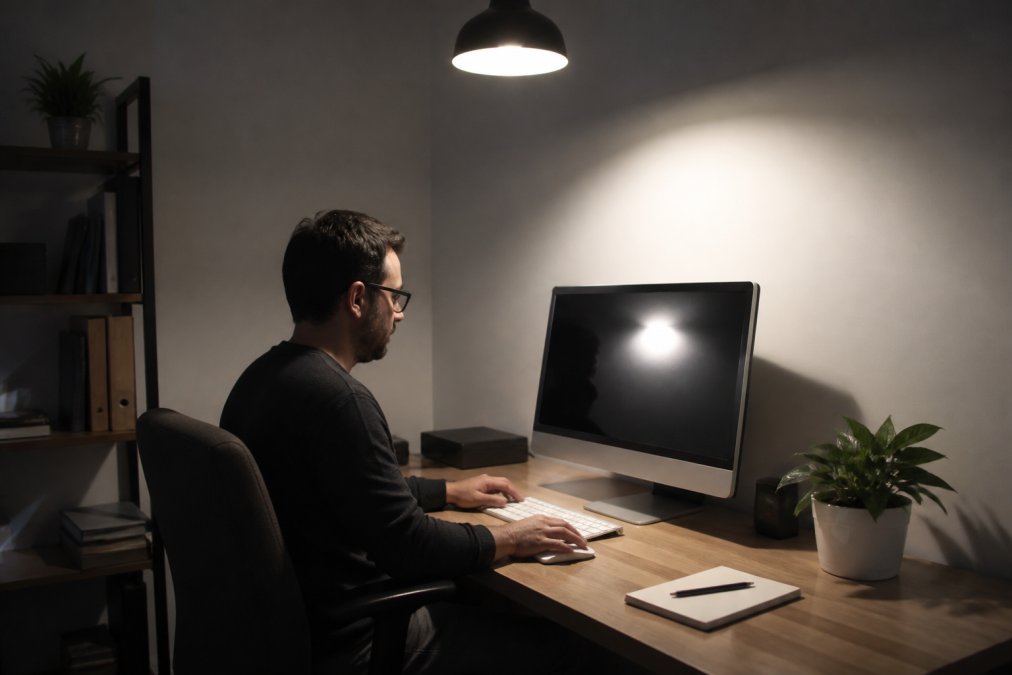
Place a piece of white paper flat on your desk. If it appears gray or yellow rather than crisp white, you lack sufficient lumens. Also note where shadows fall: a single overhead fixture often casts shadows from your head and hands onto your work surface, creating the "cave effect" many remote workers experience.
How to Reduce Screen Glare in Home Office Setups
Screen glare is often caused by light sources positioned directly in front of or behind your monitor. To reduce it, control the angle of incoming light. The most effective fix is to position your desk perpendicular to windows rather than facing them directly.
Strong light directly overhead creates harsh reflections and shadows that degrade video call quality and increase eye strain, a point emphasized by the Language of Light blog on lighting ergonomics. For artificial sources, use diffusers or bounce light off walls and ceilings. Monitor backlighting, such as an LED strip attached to the rear of your display, is a rising trend cited in Reddit's r/homedesign discussions on indirect lighting because it reduces the contrast ratio between the screen and the wall behind it.
Understanding Home Office Lighting Color Temperature
Color temperature dictates whether your space feels energizing or sleepy, and it is measured in Kelvins (K). For active work requiring focus, cooler light in the 5000K to 6500K range is optimal, as it mimics midday daylight and boosts alertness, according to iMovR's guide to lighting for focus and energy. Conversely, warmer light between 2700K and 3000K promotes relaxation and is better suited for ambient layers.
If you cannot afford a tunable fixture, choose daylight bulbs (5000K+) for your primary task lamp and reserve warm white bulbs for background lighting, the single highest-impact change you can make without buying new furniture.
Best Desk Lamps for Eye Strain: What to Look For
Selecting a desk lamp to combat eye strain goes beyond picking the brightest option. Technical specifications matter more than the price tag. Here’s what to scrutinize before you buy, with a focus on how your own vision needs should drive the decision.
Flicker-Free Drivers Are Non-Negotiable
Most people cannot consciously perceive the 50-60 Hz flicker of a cheap LED driver, but your eyes and brain register it. Over an eight-hour workday, this imperceptible strobe effect forces your pupils to constantly micro-adjust, manifesting as headaches, dry eyes, and fatigue. Look for lamps that explicitly state "flicker-free" or use a driver rated at 30,000 Hz or higher. If a listing does not mention flicker, assume it has it.
Color Rendering Index (CRI) and R9 Value
A high CRI (90+) ensures colors appear natural, reducing the visual effort needed to distinguish between a white document and a yellow sticky note. A metric most guides ignore is the R9 value, which measures how accurately reds are rendered. A lamp with a high CRI but a low R9 will make skin tones look sallow and text on colored paper appear muddy. Aim for a CRI of 95 or higher and an R9 of 80 or above.
Beam Angle and Glare Control
A narrow beam creates a hot spot on your desk and a sharp falloff into darkness, forcing your eyes to work harder. Look for a wide beam angle (at least 120 degrees) or a diffusing lens. The fixture should also have a deep shade or baffle that prevents the bulb from being visible at your seated eye level.
Addressing Specific Vision Impairments
Standard lighting advice fails people with astigmatism or light sensitivity. For astigmatism, a single point source of light can cause starbursts and halos; the fix is indirect, diffused light bounced off the ceiling or a wall. For photophobia, the solution is not less light but more control: a lamp with a stepless dimmer that drops to below 10% output lets you fine-tune intensity to just above your threshold of discomfort.
The Repurposing Angle: What You Already Own
Before buying a new lamp, evaluate what you have. A standard household floor lamp with a three-way bulb can be repurposed as ambient light by aiming it at a white wall or ceiling for bounce lighting. An old desk lamp with a metal shade can be retrofitted with a frosted glass bulb or clip-on diffuser. The Magnetic Rechargeable Wall Lamp from ShopVerse.life works well here because its flexible head and magnetic base allow precise positioning to avoid scattering light into your eyes, and its stepless dimming provides fine control for sensitive vision.

The Practical Test
When evaluating any lamp, place it in its intended position, turn on your monitor, and sit in your working posture. Look at your screen, then at a piece of paper on your desk. If your pupils feel like they are rapidly dilating and contracting between the two surfaces, the lamp is not suitable. managing window light.
Layer Your Lighting: Ambient, Task, and Accent
Relying on a single ceiling light is the most common mistake in home offices. Professional design uses three layers: ambient for general illumination, task for focused work, and accent for depth. Ambient light should be soft and indirect, ideally bounced off the ceiling or walls to eliminate harsh shadows.
Your task light handles the 100 lumens per square foot requirement on your immediate work surface. Accent lighting, such as hidden LED strips on shelves or a decorative sconce, adds visual interest and reduces the "cave" feeling. Current 2026 design guidance suggests warming the ambient layer by replacing standard bulbs with those in the 2700K-3000K range on a dimmer switch to provide depth and reduce eye strain, per LightFixturesUSA's 2026 home office lighting trends.
| Lighting Layer | Purpose | Recommended Color Temp | Placement |
|---|---|---|---|
| Ambient | General room illumination | 2700K-3000K | Ceiling fixtures, indirect bounce |
| Task | Focused work surface light | 5000K-6500K | Desk lamp, under-shelf strip |
| Accent | Depth and visual interest | 2700K-3000K | Shelves, wall sconces, backlighting |
Lighting Solutions for Windowless Home Offices
A windowless office challenges your brain to maintain a natural circadian rhythm without external daylight cues. The solution is not just more light, but a dynamic lighting ecosystem that mimics the sun's arc across the sky. This requires automated scheduling and video-call-specific lighting.
Building a Circadian Lighting Schedule
The most effective strategy is to use smart bulbs or smart plugs to automate your lighting schedule, simulating the natural progression of daylight. Here is a practical schedule based on a standard 9-to-5 workday:
- 8:00 AM - 10:00 AM: Bright, cool light at 5000K-6500K at 100% brightness. This signals to your brain that it is morning and suppresses melatonin production.
- 10:00 AM - 2:00 PM: Maintain high brightness but allow the color temperature to drift slightly to around 4000K-5000K. This is your peak focus window.
- 2:00 PM - 4:00 PM: Drop to 3500K-4000K. This mimics the slight warming of the afternoon sun and helps prevent the post-lunch energy crash.
- 4:00 PM - 6:00 PM: Transition to 2700K-3000K at 70% brightness. This signals the wind-down phase.
- After 6:00 PM: Drop to 2200K-2700K at 30-40% brightness. This is your ambient relaxation mode.
Most smart home platforms (Google Home, Amazon Alexa, Apple HomeKit) allow you to set these automations natively. Use a single smart bulb in your primary overhead fixture and a second in your task lamp, programmed on the same schedule.
The Video Call Lighting Gap
Most lighting guides ignore the fact that your home office is now a broadcast studio. In a windowless room, you have complete control over your lighting, an advantage. The goal is a three-point lighting setup that makes you look professional on camera.
- Key Light: This is your main light source. It should be positioned at a 45-degree angle to your face, slightly above eye level. This creates depth and prevents the flat, washed-out look of direct overhead light. A simple LED panel or a desk lamp with a diffuser works well. The Modern LED Acrylic Wall Sconce can be mounted on the wall directly behind your monitor to act as a subtle backlight, separating you from the background.
- Fill Light: This is a softer light source on the opposite side of your key light, at a lower intensity. It fills in the harsh shadows on the side of your face. In a windowless room, you can bounce your key light off a white wall or use a second, dimmer lamp.
- Backlight: This light comes from behind you, aimed at your shoulders and the back of your head. It creates a rim of light that separates you from the background, preventing you from blending into a dark wall. This is critical in a windowless room where the background is often a flat, dark surface.
The "Faux Window" Technique
To combat the claustrophobic feel of a windowless room, create a visual focal point that mimics a window. Mount a wall sconce at eye level and pair it with art or a plant; the light draws the eye and creates the illusion of depth. Light-colored wall paint (LRV of 70 or higher) also distributes lumens more efficiently, making the room feel larger and brighter.

A Practical Warning on Color Temperature
Do not use a single cool white bulb (5000K+) in a windowless room all day. While it keeps you alert in the morning, it will disrupt melatonin production in the evening, leading to poor sleep. If you cannot afford smart bulbs, use a lamp with tunable color temperature or physically swap bulbs mid-day.
Common Lighting Mistakes to Avoid
Several recurring errors undermine well-intentioned lighting upgrades. The first is positioning the monitor directly under a ceiling fixture, creating a bright spot on the screen and a dark shadow over the keyboard. Another is using only warm light throughout the day, which makes you feel relaxed when you need to be alert.
Direct glare from improperly placed light sources remains the top mistake in 2026 guidance. Keep your brightest light source at a 45-degree angle to your monitor, not parallel to it. Also avoid relying solely on overhead lighting for video calls; a dimly lit face against a bright window makes you look like a silhouette.
Your Home Office Lighting Action Plan
Fixing your lighting does not require a complete renovation. Start with a three-step action plan to address the most impactful issues first.
- Eliminate glare: Reposition your desk or monitor to remove reflections. Add a monitor backlight to reduce contrast.
- Upgrade your task light: Ensure you have a flicker-free, high-CRI lamp positioned to illuminate your documents without hitting your screen.
- Add an ambient layer: Install a dimmer switch and use warmer bulbs to soften the room's background light.
Intervention studies have demonstrated that adjusting lighting intensity using lamps significantly impacts the home environment and health outcomes, as documented in the NIH systematic review on lighting in the home. This confirms that your setup is not just about aesthetics; it is about physical well-being.
Creating a productive workspace is a process of elimination, starting with the physical discomfort caused by poor visibility. ShopVerse.life offers a curated selection of lighting solutions, from magnetic wall lamps to decorative sconces, designed to solve these specific problems without cluttering your desk. With secure payments, fast shipping, and a money-back guarantee, you can upgrade your workspace with confidence. Browse the collection and find the right light for your setup today.
Shop All
Frequently Asked Questions
What is the recommended color temperature for a home office?
For active work, use cooler light between 5000K and 6500K to boost focus. For ambient lighting, switch to warmer tones in the 2700K to 3000K range to create a relaxed environment and reduce eye strain. Many modern desk lamps offer tunable settings, letting you adjust the color temperature based on the time of day.
How do I position my desk to avoid screen glare?
Place your desk perpendicular to windows so natural light comes from the side, not behind or in front of your monitor. For artificial light, ensure fixtures are not directly behind you, as this creates reflections on the screen. A diffused task light aimed at your documents, rather than your display, also helps minimize glare.
What is the 3-layer lighting rule for home offices?
The rule splits your lighting into three types: ambient for overall room illumination, task for focused work areas, and accent for depth. In a home office, use warm dimmable ambient light (2700K-3000K), a cool task light (5000K+) on your desk, and accent lighting like LED strips behind your monitor to reduce contrast and eye fatigue.
Can poor lighting in a home office cause eye strain?
Yes. Insufficient light forces your eyes to work harder, while harsh glare from unshielded bulbs or reflections on your screen causes discomfort. Aim for at least 100 lumens per square foot in your workspace. Using flicker-free, dimmable fixtures with a high CRI also improves visual comfort during long work sessions.